


JavaScript Closures - The Concept Interviewers Actually Test
Closures are one of the most asked-about JavaScript concepts in interviews, and also one of the most misunderstood. This blog explains what a closure actually is, why functions can remember variables from outside their own scope, and where closures show up in real code
You've probably used a closure without knowing it had a name. Ever written a function inside another function and had the inner one still work with a variable from the outer one, even after the outer function finished running? That's a closure. It sounds like magic the first time you notice it, because by every normal rule, that outer variable should be gone the moment the outer function returns. It isn't. JavaScript keeps it alive specifically because the inner function still needs it.
This is also one of the most asked interview questions in JavaScript, and one of the most poorly explained ones, usually reduced to a one-line definition that sounds correct but doesn't actually help you use closures on purpose. This blog explains why closures exist, what's really happening in memory when one is created, and where you'll run into them in real code.
What problem does a closure actually solve?
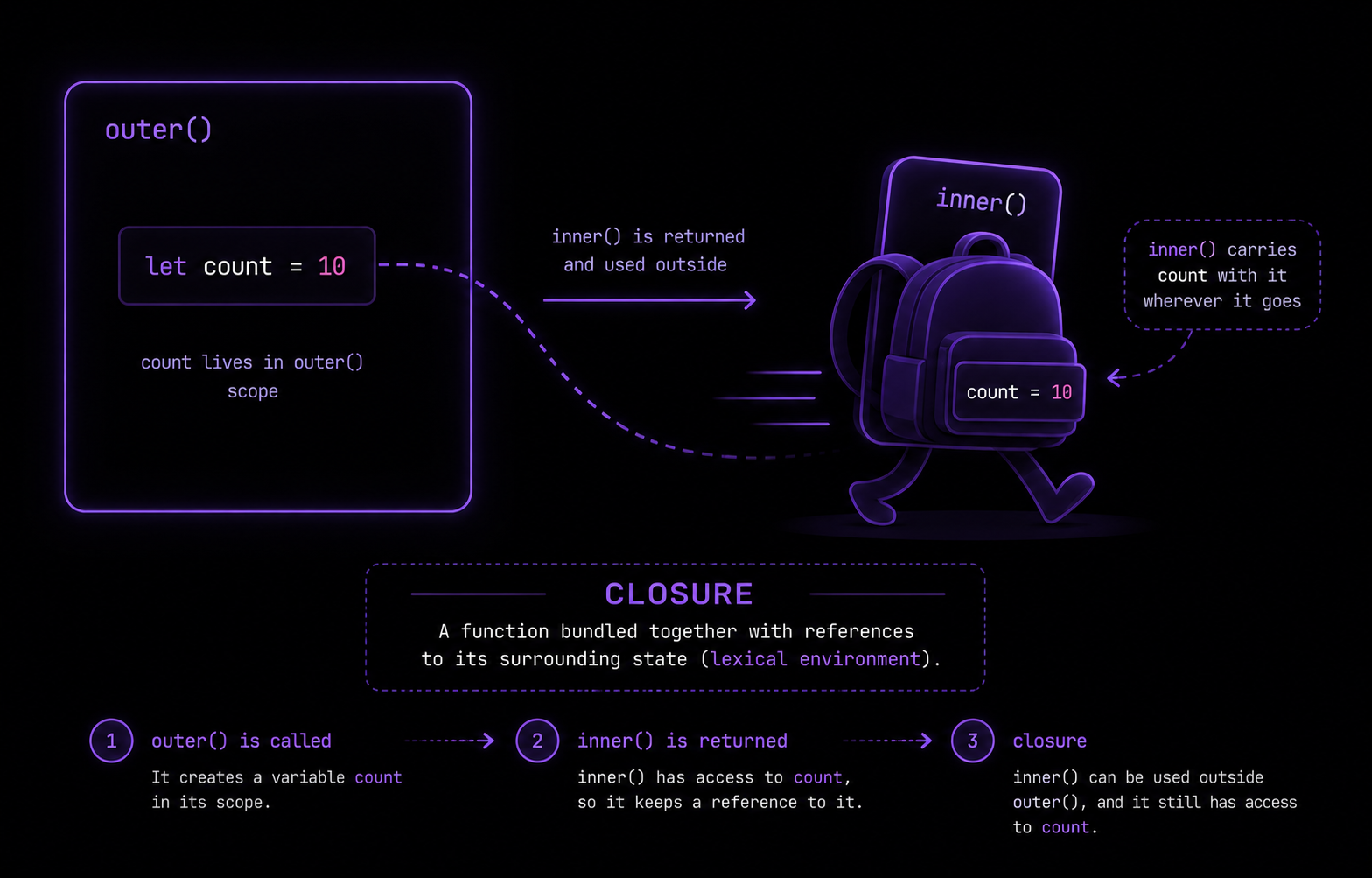
Every function in JavaScript remembers the environment it was created in - not just what's inside it, but everything it had access to at the moment it was defined. This is the whole idea behind closures: a function paired with the variables from its surrounding scope, bundled together, even after that surrounding scope has technically finished executing.
Without this, functions would only ever be able to use their own local variables or truly global ones. You couldn't build a function that "remembers" something specific to how it was created. Counters that keep their own private count, functions that get customized once and reused many times, event handlers that need to hold onto a specific piece of data - all of that depends on closures existing.
A basic closure example
js
function outer() {
  const message = "Hello from outer";

  function inner() {
    console.log(message);
  }

  return inner;
}

const greet = outer();
greet(); // "Hello from outer"
Walk through what actually happens here. outer() runs, creates a local variable message, defines inner, and returns inner - not calls it, just returns the function itself. By the time outer() finishes, you'd expect message to be gone, cleaned up like any other local variable once its function is done running.
But greet() still logs "Hello from outer" perfectly. That's because inner was defined inside outer, so it formed a closure over outer's variables at creation time. JavaScript sees that inner still references message, and keeps that variable alive in memory instead of discarding it, specifically for inner to use whenever it eventually gets called.
Why does this actually work? Lexical scope
Closures exist because of lexical scope - the rule that a function's access to variables is determined by where it is physically written in your code, not by where or when it gets called. inner was written inside outer, so inner has access to everything in outer's scope, permanently, regardless of when or where inner actually runs later.
Every time a function is created, JavaScript attaches a reference to its surrounding scope along with it. That bundle - the function plus its surrounding scope - is the closure. It's not something you have to manually set up. Every function in JavaScript forms a closure automatically the moment it's defined, whether or not you end up relying on it.
If you've read our <a href="
https://codekk.dev/blog/javascript-this-keyword-explained">'this' keyword guide</a>, it's worth noticing the contrast here:this is decided by how a function is called, while closures are decided by where a function is written. They're opposite mechanisms solving different problems, and mixing them up is a common source of confusion.Real use case: private variables
One of the most practical uses of closures is faking private state, something JavaScript didn't natively support well until class private fields (#field) arrived. Closures have been the standard way to do this for years, and you'll still see this pattern constantly.
js
function createCounter() {
  let count = 0;

  return {
    increment() {
      count++;
      return count;
    },
    reset() {
      count = 0;
    }
  };
}

const counter = createCounter();
console.log(counter.increment()); // 1
console.log(counter.increment()); // 2
console.log(counter.count); // undefined - no direct access
counter.reset();
console.log(counter.increment()); // 1
Notice that count is never exposed directly. There's no counter.count you can read or overwrite from outside. The only way to interact with it is through increment() and reset(), both of which form a closure over the same count variable from createCounter. Every call to createCounter() creates a fresh, independent count, so multiple counters never interfere with each other.
js
const counterA = createCounter();
const counterB = createCounter();
counterA.increment();
counterA.increment();
console.log(counterA.increment()); // 3
console.log(counterB.increment()); // 1, completely separate
Real use case: function factories
Closures let you create specialized versions of a function without rewriting it. This pattern is called a function factory - a function that returns other functions, each customized with different data baked in.
js
function multiplyBy(factor) {
  return function (number) {
    return number * factor;
  };
}

const double = multiplyBy(2);
const triple = multiplyBy(3);

console.log(double(5)); // 10
console.log(triple(5)); // 15
double and triple are both created from the same multiplyBy function, but each one closed over a different value of factor at the moment it was created. double will always multiply by 2, triple will always multiply by 3, and neither one needs factor passed in again. This pattern shows up a lot in real code - configuration functions, event handler generators, and middleware in libraries like Express all lean on this same idea.
The classic bug: closures inside loops
This is the single most common place closures cause real confusion, especially with var.
js
function setupButtons() {
  for (var i = 1; i <= 3; i++) {
    setTimeout(function () {
      console.log(i);
    }, 1000);
  }
}

setupButtons(); // logs 4, 4, 4 - not 1, 2, 3
You'd expect this to log 1, 2, 3. It logs 4, 4, 4 instead. The reason comes down to var not being block-scoped. There is only one i for the entire loop, shared by every iteration, and by the time the setTimeout callbacks actually run (after 1000ms, well after the loop has already finished), i has already been incremented all the way to 4. All three callbacks formed a closure over the exact same i, not three separate values.
Switching var to let fixes it completely, and it's a good example of how closures and scoping rules interact.
js
function setupButtons() {
  for (let i = 1; i <= 3; i++) {
    setTimeout(function () {
      console.log(i);
    }, 1000);
  }
}

setupButtons(); // logs 1, 2, 3
let is block-scoped, so JavaScript creates a brand new i for every single iteration of the loop, instead of reusing one shared variable. Each setTimeout callback now closes over its own separate i, frozen at the value it had during that specific iteration. This single difference between var and let is one of the most common closure-related interview questions, precisely because it shows whether you understand closures or just memorized the definition.
If you want to fix this without switching to let, the older approach is wrapping the loop body in its own function to force a new scope per iteration - which is exactly what closures are for.
js
function setupButtons() {
  for (var i = 1; i <= 3; i++) {
    (function (num) {
      setTimeout(function () {
        console.log(num);
      }, 1000);
    })(i);
  }
}
Each immediately invoked function creates its own scope with its own num, so each setTimeout callback closes over a separate value instead of the shared i.
[IMAGE: Side by side diagram comparing var vs let in a loop with setTimeout - var showing one shared box labeled i pointing to all three callbacks in orange, let showing three separate boxes each with its own i value pointing to one callback each in green]
Closures and memory
Because a closure keeps its surrounding variables alive as long as the inner function exists, closures can quietly keep data in memory longer than you'd expect. If you create a closure that holds onto a large object or array, and something is still holding a reference to that closure, the large object stays in memory too, even if nothing outside the closure can reach it anymore.
This isn't usually a problem in normal code. But it matters in cases like event listeners that are never removed, or long-lived callbacks that accidentally close over large amounts of data they don't actually need. If you're setting up recurring timers or listeners, and you've read our <a href="
https://codekk.dev/blog/javascript-event-loop-explained">Event Loop guide</a>, this is the same category of "still referenced, still running" behavior applied to memory instead of execution order. The fix is usually straightforward: only close over what you actually need, and clean up listeners and intervals when they're no longer required.Quick reference - what makes a closure
Concept | What it means |
|---|---|
Closure | A function bundled with the variables from its surrounding scope at creation time |
Lexical scope | Access to variables is based on where code is written, not where it's called |
Private variables | Variables inside a closure that can't be accessed directly from outside |
Function factory | A function that returns other functions, each closing over different data |
var in loops | Shares one variable across all iterations, causing stale closure values |
let in loops | Creates a fresh variable per iteration, giving each closure its own value |
Common mistakes to avoid
The most frequent mistake is using var inside a loop when you actually need each iteration's callback to remember a different value, which is really a scoping mistake that shows up as a closure bug. The second is holding onto closures longer than necessary, like forgetting to clear an interval or remove an event listener, which keeps whatever that closure captured alive in memory even after you're done with it. Both come from the same root idea: a closure keeps its surrounding variables alive for as long as something can still call the inner function, so being deliberate about what a function actually needs to remember matters more than it looks like at first.
Closures aren't a special feature you opt into. Every function you write forms one automatically, whether you use it or not. Once you see that a closure is just "a function that remembers where it came from," the private variables pattern, the function factory pattern, and the classic loop bug all stop being separate things to memorize and become the same idea showing up in three different places.
Related Articles
More insights you might enjoy

Async/Await in JavaScript - How It Actually Works and Why It Exists
How async/await works in JavaScript - async functions, await, error handling, parallel vs sequential execution, and the most common mistakes explained.

Higher-Order Functions in JavaScript
Higher-order functions are one of the most important ideas in JavaScript, and you're probably already using them without realizing it. This blog explains what makes a function "higher-order," why they matter, and how methods like map, filter, and setTimeout all rely on this same simple idea.

How React's useEffect Actually Works - And Why Developers Misuse It
useEffect is one of the most used hooks in React and also one of the most misunderstood. This guide covers the dependency array, cleanup functions, the double render, and common mistakes that cause bugs.

Node.js and Express.js - What They Are, How They Differ, and How They Work Together
Node.js and Express.js are not the same thing. This guide explains what each does, how they work together, and covers routing, middleware, and error handling with real code.
How the JavaScript Event Loop Actually Works - A Deep Dive
A complete deep dive into the JavaScript event loop - the call stack, callback queue, microtask queue, and how they work together to make async JavaScript possible.
TypeScript vs JavaScript - What Is Actually Different and Should You Learn TypeScript
TypeScript and JavaScript are more related than most people think. This guide covers the real difference, core TypeScript features you need to know, and helps you decide whether to make the switch.
Comments
Sign in to join the conversation