

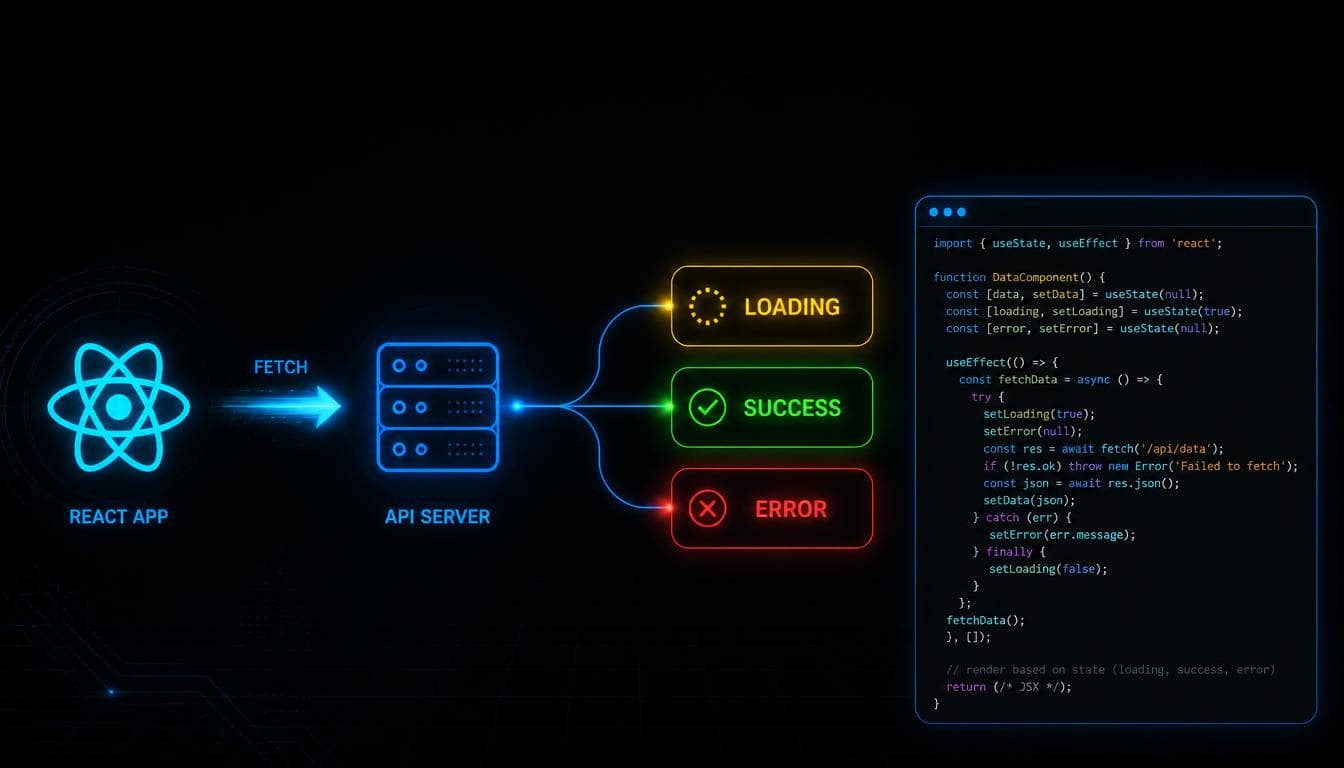
How to Fetch Data in React - A Complete Guide with Loading, Error, and Abort
Fetch API data in React the right way - loading, error, empty state, AbortController cleanup, retry and refresh. Step by step with real mistakes shown.
You know React. You can build components, manage state with useState, and you understand how useEffect works. But the moment someone says "now fetch data from an API and show it on screen" - things get complicated fast.
Do you put the fetch inside useEffect? Outside it? How do you handle loading? What about errors? What if the component unmounts before the request finishes? What if the user clicks refresh?
This blog walks through all of it - starting from the very first fetch call and building up to a production-ready pattern step by step. We will also show the real mistakes that happen along the way, because seeing why something breaks is often more useful than just seeing the correct answer.
If you want a refresher on how useEffect works before diving in, check out the
fetch returns a Promise and how .then() chaining works, the Promises blog covers that properly.The Setup
We are using a React Vite project for this. If you do not have one set up, run:
npm create vite@latest
Choose React and JavaScript (or TypeScript - the concepts are the same). We will be fetching from
JSONPlaceholder - a free public API that returns fake user data. Perfect for learning.Create a new file src/FetchAPI.jsx and we will build everything inside it.
Step 1 - The First Attempt (And Why It Does Not Work)
The most natural first instinct is to write a useEffect, call fetch, and log the result. Here is what that looks like:
import { useEffect } from "react";

function FetchAPI() {
  useEffect(() => {
    fetch("https://jsonplaceholder.typicode.com/users")
      .then((res) => console.log(res.json()))
      .catch((err) => console.log(err));
  });

  return (
    <>
      <div>
        <h2>Fetch API Example</h2>
      </div>
    </>
  );
}

export default FetchAPI;
Open the browser console and you will see something like this:
[IMAGE: Browser console showing "Promise {pending}" twice - the bug from calling console.log(res.json()) instead of chaining .then()]
Two Promise {pending} entries. Not the user data you expected.
Why does this happen?
Look at this line carefully:
.then((res) => console.log(res.json()))
res.json() does not return the parsed data directly. It returns another Promise - because parsing the response body is also an async operation. So you are logging the Promise itself, not the data inside it.
The fix is to chain another .then() to actually get the resolved value:
fetch("https://jsonplaceholder.typicode.com/users")
  .then((res) => res.json())
  .then((data) => console.log(data))
  .catch((err) => console.log(err));
Now the console shows the actual array of 10 users.
[IMAGE: Browser console showing the array of 10 user objects with name, email, username, address fields expanded]
But there is another problem here. Notice the useEffect has no dependency array. That means it runs after every single render. Every time any state in this component changes, it fires another fetch request. In a real app that would hammer your API unnecessarily. Always add the dependency array - we will fix this properly in the next step.
Step 2 - Storing the Data in State
Logging to the console is useful for debugging but the actual goal is to show the data on screen. For that you need useState.
Here is where another common mistake happens. The first instinct is to initialize the state like this:
const [users, setUsers] = useState();
But if you do that and try to call .map() on users, React immediately throws this error:
Uncaught TypeError: Cannot read properties of undefined (reading 'map')
at FetchAPI (FetchAPI.jsx:29:16)
Why? Because useState() with no argument initializes the value as undefined. And you cannot call .map() on undefined.
Think about what the API actually returns:
[
  { "id": 1, "name": "Leanne Graham" },
  { "id": 2, "name": "Ervin Howell" }
]
It is an array. So before the API responds, React should also treat the state as an array - an empty one:
const [users, setUsers] = useState([]);
Now .map() works immediately because calling .map() on an empty array is perfectly valid - it just returns nothing.
Here is the corrected version with state, proper .then() chaining, and the dependency array:
import { useEffect, useState } from "react";

function FetchAPI() {
  const [users, setUsers] = useState([]);

  useEffect(() => {
    fetch("https://jsonplaceholder.typicode.com/users")
      .then((res) => res.json())
      .then((data) => setUsers(data))
      .catch((err) => console.log(err));
  }, []); // empty array - runs only once when component mounts

  return (
    <div className="p-6 max-w-4xl mx-auto">
      <h2 className="text-2xl font-bold mb-4">Fetch API Example</h2>
      <ul className="grid grid-cols-1 sm:grid-cols-2 md:grid-cols-3 gap-4">
        {users.map((user) => (
          <li key={user.id} className="bg-white shadow p-4 rounded-xl">
            <h2 className="text-lg font-semibold">{user.name}</h2>
            <p className="text-sm text-gray-600">{user.email}</p>
            <p className="text-sm text-gray-600">{user.company.name}</p>
          </li>
        ))}
      </ul>
    </div>
  );
}

export default FetchAPI;
This works. But it has a problem - between the moment the component renders and the moment the API responds, the user sees nothing. No indication that anything is happening. That is a bad experience.
Step 3 - Adding a Loading State
Every API request goes through three possible states: it starts, it either succeeds or it fails. Your UI should reflect all three.
Request Starts
      │
      ▼
  Loading... ⏳
      │
      ▼
┌─────────────┐
│             │
▼             ▼
Success ✅   Error ❌
Start by adding a loading state. The initial value is true because when the component first renders, the request has already started - so we are already loading.
const [users, setUsers] = useState([]);
const [loading, setLoading] = useState(true);
Then update useEffect to set loading to false when the request finishes - whether it succeeded or failed:
useEffect(() => {
  fetch("https://jsonplaceholder.typicode.com/users")
    .then((res) => res.json())
    .then((data) => {
      setUsers(data);
      setLoading(false);
    })
    .catch((err) => {
      console.log(err);
      setLoading(false);
    });
}, []);
Notice setLoading(false) is called in both the success case and the catch block. The loading state needs to turn off no matter what happens.
Then before your return statement, add a loading check:
if (loading) {
  return <h2>Loading...</h2>;
}
Now React does this:
Component Mounts
      │
      ▼
loading = true → shows "Loading..."
      │
  API finishes
      │
      ▼
loading = false → shows users
[IMAGE: Flow diagram showing component lifecycle - mounts with loading=true showing "Loading..." text, API responds, loading=false showing the user cards grid]
Step 4 - Adding an Error State
Loading handles the waiting. But what if the request fails - the internet drops, the API is down, the URL has a typo?
Right now if the fetch fails, setLoading(false) runs and your component renders with an empty users array and no message explaining why. The user just sees a blank screen.
Add an error state:
const [users, setUsers] = useState([]);
const [loading, setLoading] = useState(true);
const [error, setError] = useState(null);
Update the catch block to store the error:
.catch((err) => {
  setError("Something went wrong. Please try again.");
  setLoading(false);
});
And add an error check before your return - after the loading check:
if (loading) {
  return <h2>Loading...</h2>;
}

if (error) {
  return <h2>{error}</h2>;
}
Now the full flow looks like this:
Start Request
      │
      ▼
loading = true
      │
      ▼
Request Finished
      │
   ┌──┴──┐
   │     │
   ▼     ▼
Success  Error
   │     │
   ▼     ▼
Users  Error Message
Step 5 - Handling the Empty State
What if the API responds successfully but returns zero items? With your current code, the component renders with an empty list and no explanation.
Add an empty state check in your JSX:
{users.length > 0 ? (
  <ul className="grid grid-cols-1 sm:grid-cols-2 md:grid-cols-3 gap-4">
    {users.map((user) => (
      <li key={user.id} className="bg-white shadow p-4 rounded-xl">
        <h2 className="text-lg font-semibold">{user.name}</h2>
        <p className="text-sm text-gray-600">{user.email}</p>
        <p className="text-sm text-gray-600">{user.company.name}</p>
      </li>
    ))}
  </ul>
) : (
  <p>No users found.</p>
)}
Now all four cases are handled - loading, error, empty, and data.
Step 6 - Cleanup With AbortController
This is the part most tutorials skip - and it causes a real bug in production.
Here is the scenario: a user opens a page, the fetch request starts. Before it finishes, they navigate away. The component unmounts. But the fetch request is still running in the background. When it eventually resolves, it tries to call setUsers on a component that no longer exists.
In older React versions this caused a warning:
Warning: Can't perform a React state update on an unmounted component.
In newer versions React is smarter about this, but the underlying issue still exists - you are doing unnecessary work and potentially setting state on something that should not exist anymore.
The fix is AbortController - a browser API that lets you cancel a fetch request.
useEffect(() => {
  const controller = new AbortController();

  fetch("https://jsonplaceholder.typicode.com/users", {
    signal: controller.signal
  })
    .then((res) => res.json())
    .then((data) => {
      setUsers(data);
      setLoading(false);
    })
    .catch((err) => {
      if (err.name === "AbortError") {
        // Request was cancelled - this is expected, not an error
        return;
      }
      setError("Something went wrong. Please try again.");
      setLoading(false);
    });

  // Cleanup function - runs when component unmounts
  return () => {
    controller.abort();
  };
}, []);
Here is what is happening:
new AbortController()creates a controller with asignalattached to itThat
signalis passed into thefetchoptionsWhen the component unmounts, the
useEffectcleanup function runscontroller.abort()This cancels the in-flight request
The fetch Promise rejects with an
AbortErrorWe check for that specific error name and ignore it - because this is intentional cancellation, not a real failure
This is the same pattern we covered in the
useEffect deep dive blog - cleanup functions exist exactly for situations like this.Step 7 - Adding Retry and Refresh
Two more things that production apps need: a way to retry after an error, and a way to refresh the data manually.
Both of these come from the same idea - make the fetch logic re-run on demand.
The cleanest way to do this in React is to have a piece of state that acts as a trigger. Every time it changes, the useEffect re-runs.
const [retryCount, setRetryCount] = useState(0);

// Add retryCount to the dependency array
useEffect(() => {
  const controller = new AbortController();
  setLoading(true);
  setError(null);

  fetch("https://jsonplaceholder.typicode.com/users", {
    signal: controller.signal
  })
    .then((res) => res.json())
    .then((data) => {
      setUsers(data);
      setLoading(false);
    })
    .catch((err) => {
      if (err.name === "AbortError") return;
      setError("Something went wrong. Please try again.");
      setLoading(false);
    });

  return () => controller.abort();
}, [retryCount]); // re-runs whenever retryCount changes
Now add buttons for retry and refresh in your UI:
// Show retry button when there is an error
if (error) {
  return (
    <div>
      <h2>{error}</h2>
      <button onClick={() => setRetryCount((prev) => prev + 1)}>
        Retry
      </button>
    </div>
  );
}
// Show refresh button when data is loaded
<button onClick={() => setRetryCount((prev) => prev + 1)}>
  Refresh
</button>
Every time retryCount increments, the useEffect dependency array detects the change and re-runs the fetch. It is the same mechanism, used for two different purposes - retrying after failure and refreshing on demand.
Notice we also added setLoading(true) and setError(null) at the top of the effect. This resets the state before each new request so the loading spinner shows again and the previous error clears.
The Complete Production-Ready Component
Here is everything put together:
import { useEffect, useState } from "react";

function FetchAPI() {
  const [users, setUsers] = useState([]);
  const [loading, setLoading] = useState(true);
  const [error, setError] = useState(null);
  const [retryCount, setRetryCount] = useState(0);

  useEffect(() => {
    const controller = new AbortController();
    setLoading(true);
    setError(null);

    fetch("https://jsonplaceholder.typicode.com/users", {
      signal: controller.signal,
    })
      .then((res) => res.json())
      .then((data) => {
        setUsers(data);
        setLoading(false);
      })
      .catch((err) => {
        if (err.name === "AbortError") return;
        setError("Something went wrong. Please try again.");
        setLoading(false);
      });

    return () => controller.abort();
  }, [retryCount]);

  if (loading) {
    return <h2>Loading...</h2>;
  }

  if (error) {
    return (
      <div>
        <h2>{error}</h2>
        <button onClick={() => setRetryCount((prev) => prev + 1)}>
          Retry
        </button>
      </div>
    );
  }

  return (
    <div className="p-6 max-w-4xl mx-auto">
      <div className="flex items-center justify-between mb-4">
        <h2 className="text-2xl font-bold">Fetch API Example</h2>
        <button
          onClick={() => setRetryCount((prev) => prev + 1)}
          className="px-4 py-2 bg-blue-500 text-white rounded"
        >
          Refresh
        </button>
      </div>

      {users.length > 0 ? (
        <ul className="grid grid-cols-1 sm:grid-cols-2 md:grid-cols-3 gap-4">
          {users.map((user) => (
            <li key={user.id} className="bg-white shadow p-4 rounded-xl">
              <h2 className="text-lg font-semibold">{user.name}</h2>
              <p className="text-sm text-gray-600">{user.email}</p>
              <p className="text-sm text-gray-600">{user.company.name}</p>
            </li>
          ))}
        </ul>
      ) : (
        <p>No users found.</p>
      )}
    </div>
  );
}

export default FetchAPI;
Feature Checklist - What This Component Handles
Feature | Status |
|---|---|
Fetch data from API | Done |
Render data on screen | Done |
Loading state | Done |
Error state | Done |
Empty state | Done |
Cleanup / Abort request | Done |
Retry after error | Done |
Manual refresh | Done |
What to Learn Next
This is the foundational pattern for data fetching in React. Once you are comfortable with it, the natural next step is to look at libraries like React Query (also called TanStack Query) which handles all of this - caching, background refetching, retry logic, loading and error states - out of the box. But understanding what it is doing under the hood, which you now do, makes using those libraries much easier.
The fetch pattern you built here also connects directly to how Server Components work in Next.js - which we covered in the
await fetch() directly without useEffect or state at all, because the rendering happens on the server before it reaches the browser.Related Articles
More insights you might enjoy

How to Build an Active Link Indicator in Next.js - Navbar and Sidebar
Learn how to build an active link indicator in Next.js using usePathname - works for both navbar and sidebar with clean Tailwind CSS styling.

React vs Next.js: What's Actually Different and When to Use Which
React and Next.js are often confused - one is a UI library, the other is a full framework built on top of it. This post breaks down the real differences: rendering strategies, routing, API routes, and when to pick one over the other.

How React's useEffect Actually Works - And Why Developers Misuse It
useEffect is one of the most used hooks in React and also one of the most misunderstood. This guide covers the dependency array, cleanup functions, the double render, and common mistakes that cause bugs.

How the Virtual DOM Works in React (And Why It Exists)
Every React developer has heard "Virtual DOM" a hundred times, but few can explain what it actually does. This blog breaks down the real problem it solves, how React's diffing algorithm decides what to update, and why that matters for how you write components.
Comments
Sign in to join the conversation