


JavaScript Hoisting Explained (With Simple Examples)
Hoisting is one of the first JavaScript concepts that confuses beginners, because it makes code behave in ways that don't match how it looks. This blog breaks down what hoisting actually is, how var, let, and const behave differently, and why you sometimes get "undefined" instead of an error
Have you ever run this code and got confused?
js
console.log(name);
var name = "Rohit";
You'd expect an error, right? You're using name before you even declared it. But this code does not throw an error. It logs undefined. That's weird, and it's the first sign that something happens behind the scenes before your code actually runs. That "something" is called hoisting.
This blog explains hoisting in plain, simple words. No confusing terms, no long sentences. Just what it is, why it happens, and how to avoid the common mistakes beginners make with it.
What is hoisting?
Hoisting is a JavaScript behavior where variable and function declarations are moved to the top of their scope before the code runs.
That's the short definition. But "moved to the top" can sound confusing, so let's slow down and understand it with a simple idea.
JavaScript reads your code in two steps
This is the easiest way to understand hoisting. JavaScript does not run your code in just one pass. It goes through your code twice.
Step 1: Setup. JavaScript quickly scans your code first, before running anything. During this scan, it notices every variable and function you declared, and sets up space for them in memory. It does not run any code yet. It's just preparing.
Step 2: Run. Now JavaScript actually runs your code, line by line, from top to bottom, like you'd expect.
Hoisting happens during Step 1, the setup step. This is why a variable can technically "exist" even before the line where you wrote it, because JavaScript already made room for it during setup.
Keep this two-step idea in mind. Everything else in this blog is really just showing you how this plays out differently for var, let, const, and functions.
Hoisting with var
When you declare a variable with var, JavaScript does two things during the setup step. It creates the variable, and it also gives it a starting value of undefined, before your code even runs.
js
console.log(name);
var name = "Rohit";

// Output: undefined
This is why you get undefined instead of an error. By the time console.log(name) runs, the variable name already exists (because of hoisting), but it doesn't have its real value yet, because the line name = "Rohit" hasn't run yet. Only the declaration was hoisted, not the value.
Think of it like this. JavaScript hoists the sentence "there is a variable called name" to the top. It does not hoist the sentence "name equals Rohit" to the top. The value only gets assigned when your code actually reaches that line while running.
Hoisting with let and const
let and const are hoisted too, but they behave very differently from var. This is one of the most common things beginners get wrong.
js
console.log(age);
let age = 25;

// Output: ReferenceError - Cannot access 'age' before initialization
This time, you get an actual error, not undefined. So does that mean let is not hoisted at all? No, it is hoisted. But let and const do not get the automatic undefined value that var gets. They stay in a kind of "locked" state from the top of the scope until the line where they're declared. If you try to use them before that line, JavaScript stops you with an error instead of quietly giving you undefined.
This locked period has a name: the temporal dead zone, often shortened to TDZ. It sounds like a complicated term, but it just means "the time between the start of the scope and the actual declaration line, during which the variable exists but cannot be used yet."
js
// Temporal Dead Zone starts here for "age"
console.log(age); // Error - still in the dead zone
let age = 25; // Temporal Dead Zone ends here
console.log(age); // 25 - works fine now
Here's a simple way to remember the difference. var is hoisted and given a placeholder value of undefined, so using it early doesn't crash your code, it just gives you a confusing value. let and const are hoisted too, but JavaScript blocks you from touching them until their actual line runs, which is why you get a clear error instead of a silent bug.
Most developers consider this a good thing. Getting a clear error early is much easier to fix than getting a quiet undefined that causes a bug somewhere else later in your code.
Hoisting with functions
Functions behave differently depending on how you write them, and this trips up a lot of beginners.
Function declarations are fully hoisted. This means you can call them even before the line where they're written in your code.
js
sayHello(); // Works fine, even though it's called before the function is written

function sayHello() {
  console.log("Hello!");
}
This works because JavaScript hoists the entire function, not just its name, during the setup step. So the function is ready to use right from the start.
Function expressions are not fully hoisted. A function expression is when you store a function inside a variable, using var, let, or const.
js
sayHi(); // TypeError - sayHi is not a function

var sayHi = function () {
  console.log("Hi!");
};
Here, only the variable sayHi gets hoisted, exactly like any other var variable, with a starting value of undefined. The actual function only gets assigned to sayHi when your code reaches that line. So when you try to call sayHi() before that line, you're really trying to call undefined(), which is not a function, and JavaScript throws an error.
If you had used let or const instead of var for a function expression, you'd get the temporal dead zone error instead, for the same reason as any other let or const variable.
A simple example that ties it all together
js
console.log(a); // undefined
console.log(b); // ReferenceError
console.log(sum); // TypeError

var a = 10;
let b = 20;
var sum = function () {
  return a + b;
};
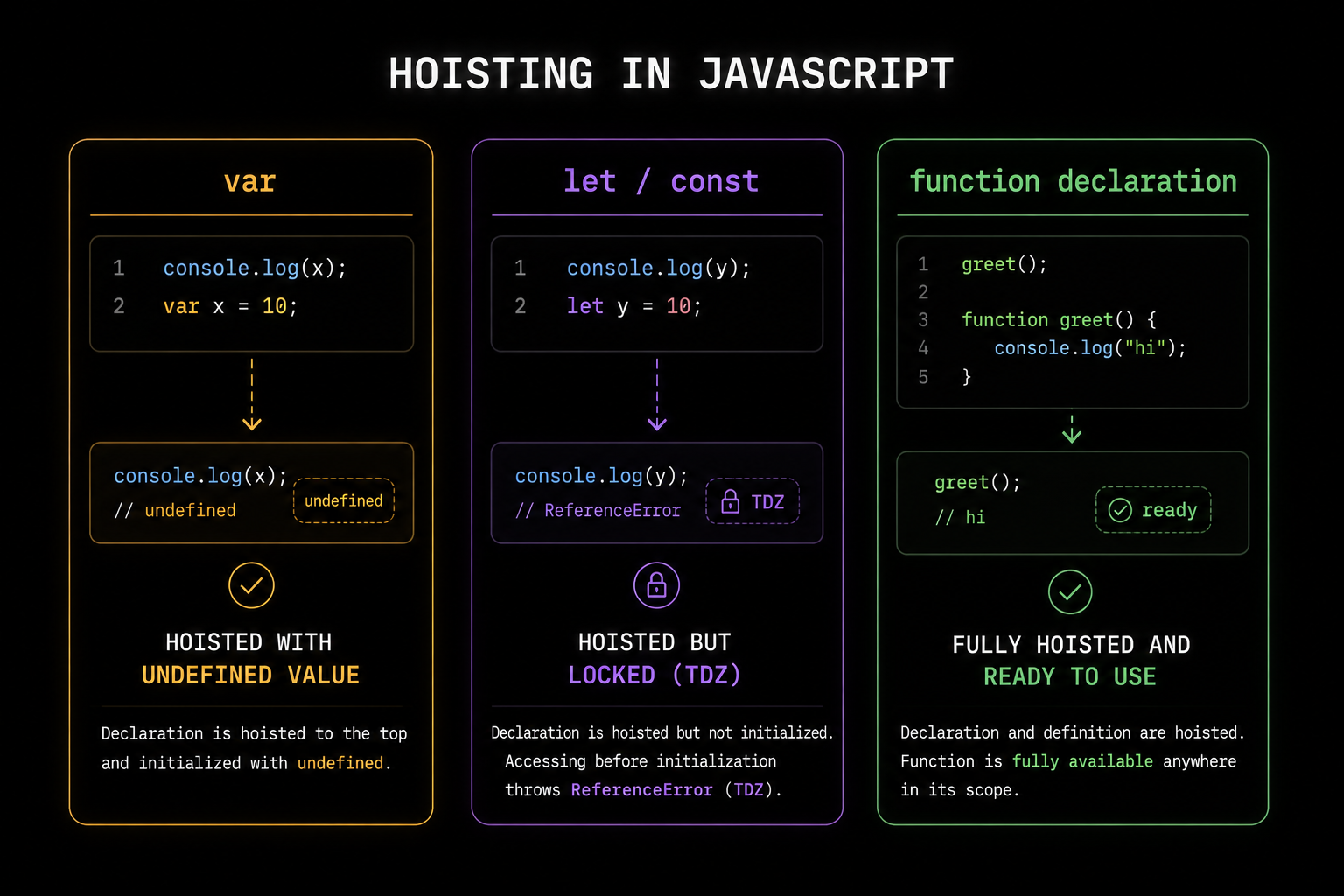
a logs undefined because var is hoisted with a placeholder value. b throws an error because let is hoisted but stuck in the temporal dead zone until its line runs. sum throws a different error because it's a function expression stored in a var, so only the variable is hoisted, not the function itself, and calling undefined as a function fails.
Once you see all three side by side like this, hoisting stops feeling random. Each one is just following its own simple rule.
[IMAGE: A dark background diagram showing three boxes side by side labeled "var", "let/const", and "function declaration" - var box shows "hoisted with undefined value" in orange, let/const box shows "hoisted but locked (TDZ)" in purple, function declaration box shows "fully hoisted and ready to use" in green]
Quick reference - how hoisting works
Type | Is it hoisted? | What happens if used before its line |
|---|---|---|
| Yes | Returns |
| Yes, but locked | Throws a ReferenceError (temporal dead zone) |
| Yes, but locked | Throws a ReferenceError (temporal dead zone) |
Function declaration | Fully hoisted | Works completely fine |
Function expression ( | Only the variable, not the function | Throws a TypeError |
Function expression ( | Only the variable, and it's locked | Throws a ReferenceError |
Common mistakes beginners make
The most common mistake is assuming let and const are not hoisted at all, just because they throw an error instead of returning undefined. They are hoisted, they're just locked until their line runs. The second common mistake is trying to call a function expression before it's defined, expecting it to behave like a regular function declaration, when only the variable part gets hoisted, not the function itself.
A good habit that avoids both of these mistakes completely is simple: always declare your variables and functions before you use them in your code, from top to bottom, the way you'd naturally read a page. You don't really need to rely on hoisting on purpose. Understanding it is mainly about knowing why certain errors happen, not about writing code that depends on it.
If you're still getting comfortable with var, let, and const, our <a href="
var and let really matters, especially inside loops. And if you want to understand what happens after this setup step, once your code is actually running function by function, our <a href="https://codekk.dev/blog/javascript-this-keyword-explained">'this' keyword guide</a> is a good next read.Hoisting is not magic, and it's not something you need to memorize word for word. It's just JavaScript quickly setting things up before it runs your code. Once you know that one idea, undefined values, temporal dead zone errors, and function call errors all start making sense on their own.
Related Articles
More insights you might enjoy

Async/Await in JavaScript - How It Actually Works and Why It Exists
How async/await works in JavaScript - async functions, await, error handling, parallel vs sequential execution, and the most common mistakes explained.

JavaScript Closures - The Concept Interviewers Actually Test
Closures are one of the most asked-about JavaScript concepts in interviews, and also one of the most misunderstood. This blog explains what a closure actually is, why functions can remember variables from outside their own scope, and where closures show up in real code

Higher-Order Functions in JavaScript
Higher-order functions are one of the most important ideas in JavaScript, and you're probably already using them without realizing it. This blog explains what makes a function "higher-order," why they matter, and how methods like map, filter, and setTimeout all rely on this same simple idea.

React vs Next.js: What's Actually Different and When to Use Which
React and Next.js are often confused - one is a UI library, the other is a full framework built on top of it. This post breaks down the real differences: rendering strategies, routing, API routes, and when to pick one over the other.

How React's useEffect Actually Works - And Why Developers Misuse It
useEffect is one of the most used hooks in React and also one of the most misunderstood. This guide covers the dependency array, cleanup functions, the double render, and common mistakes that cause bugs.

Node.js and Express.js - What They Are, How They Differ, and How They Work Together
Node.js and Express.js are not the same thing. This guide explains what each does, how they work together, and covers routing, middleware, and error handling with real code.
Comments
Sign in to join the conversation