<!doctype html>
<html lang="en" data-bs-theme="light">
<head>
<meta charset="UTF-8" />
<meta name="viewport" content="width=device-width, initial-scale=1" />
<title>Responsive Navbar — Bootstrap 5</title>
<!-- Bootstrap 5.3 + Bootstrap Icons -->
<link
href="https://cdn.jsdelivr.net/npm/bootstrap@5.3.3/dist/css/bootstrap.min.css"
rel="stylesheet"
/>
<link
href="https://cdn.jsdelivr.net/npm/bootstrap-icons@1.11.3/font/bootstrap-icons.min.css"
rel="stylesheet"
/>
<link rel="stylesheet" href="css/style.css" />
</head>
<body>
<!-- ═════════════════════ NAVBAR ═════════════════════ -->
<nav
class="navbar navbar-expand-lg site-nav sticky-top"
id="siteNav"
aria-label="Main navigation"
>
<div class="container-xl">
<!-- Brand -->
<a
class="navbar-brand d-flex align-items-center gap-2 me-lg-4"
href="#"
>
<span class="brand-mark" aria-hidden="true"></></span>
<span class="brand-name">code<span>kk</span></span>
</a>
<!-- Mobile: quick actions + toggler -->
<div class="d-flex align-items-center gap-2 d-lg-none">
<button
class="btn-icon"
type="button"
data-theme-toggle
aria-label="Toggle dark mode"
>
<i class="bi bi-moon-stars" data-theme-icon></i>
</button>
<button
class="nav-toggler"
type="button"
data-bs-toggle="offcanvas"
data-bs-target="#navOffcanvas"
aria-controls="navOffcanvas"
aria-label="Open menu"
>
<span></span>
</button>
</div>
<!-- Offcanvas on mobile, inline on desktop -->
<div
class="offcanvas offcanvas-end"
tabindex="-1"
id="navOffcanvas"
aria-labelledby="navOffcanvasLabel"
>
<div class="offcanvas-header border-bottom">
<a
class="d-flex align-items-center gap-2 text-decoration-none text-body"
href="#"
id="navOffcanvasLabel"
>
<span class="brand-mark" aria-hidden="true"></></span>
<span class="brand-name">code<span>kk</span></span>
</a>
<button
type="button"
class="btn-close"
data-bs-dismiss="offcanvas"
aria-label="Close menu"
></button>
</div>
<div class="offcanvas-body align-items-lg-center">
<!-- Search (first on mobile, right side on desktop) -->
<form
class="nav-search order-lg-2 ms-lg-auto"
role="search"
id="navSearchForm"
>
<i class="bi bi-search" aria-hidden="true"></i>
<input
class="form-control"
type="search"
id="navSearch"
placeholder="Search components…"
aria-label="Search components"
/>
<kbd data-shortcut-label>Ctrl K</kbd>
</form>
<!-- Links -->
<ul class="navbar-nav gap-lg-1 order-lg-1">
<!-- Components (wide dropdown) -->
<li class="nav-item dropdown">
<a
class="nav-link dropdown-toggle"
href="#"
role="button"
data-bs-toggle="dropdown"
data-bs-auto-close="outside"
aria-expanded="false"
>
Components
</a>
<div class="dropdown-menu dd-wide">
<div class="dd-grid">
<a class="dropdown-item" href="#components">
<span class="dd-icon"
><i class="bi bi-grid-1x2"></i
></span>
<span
><span class="d-block dd-title">UI library</span>
<span class="d-block dd-desc"
>Buttons, cards, loaders and more</span
></span
>
</a>
<a class="dropdown-item" href="#categories">
<span class="dd-icon"
><i class="bi bi-collection"></i
></span>
<span
><span class="d-block dd-title">Categories</span>
<span class="d-block dd-desc"
>Browse by component type</span
></span
>
</a>
<a class="dropdown-item" href="#marketplace">
<span class="dd-icon"><i class="bi bi-shop"></i></span>
<span
><span class="d-block dd-title">Marketplace</span>
<span class="d-block dd-desc"
>Community-built components</span
></span
>
</a>
<a class="dropdown-item" href="#skeletons">
<span class="dd-icon"
><i class="bi bi-hourglass-split"></i
></span>
<span
><span class="d-block dd-title">Loader skeletons</span>
<span class="d-block dd-desc"
>Ready-made loading states</span
></span
>
</a>
</div>
</div>
</li>
<li class="nav-item">
<a class="nav-link" href="#blogs">Blogs</a>
</li>
<!-- Tools -->
<li class="nav-item dropdown">
<a
class="nav-link dropdown-toggle"
href="#"
role="button"
data-bs-toggle="dropdown"
data-bs-auto-close="outside"
aria-expanded="false"
>
Tools
</a>
<div class="dropdown-menu">
<a class="dropdown-item" href="#palette">
<span class="dd-icon"><i class="bi bi-palette"></i></span>
<span
><span class="d-block dd-title">Color palette</span>
<span class="d-block dd-desc"
>Generate accessible palettes</span
></span
>
</a>
<a class="dropdown-item" href="#gradient">
<span class="dd-icon"
><i class="bi bi-circle-half"></i
></span>
<span
><span class="d-block dd-title">Gradient generator</span>
<span class="d-block dd-desc"
>Linear, radial and conic</span
></span
>
</a>
<a class="dropdown-item" href="#typography">
<span class="dd-icon"><i class="bi bi-fonts"></i></span>
<span
><span class="d-block dd-title"
>Typography playground</span
>
<span class="d-block dd-desc"
>Type scales and pairings</span
></span
>
</a>
<a class="dropdown-item" href="#meta">
<span class="dd-icon"><i class="bi bi-tags"></i></span>
<span
><span class="d-block dd-title">Meta tag generator</span>
<span class="d-block dd-desc"
>SEO and social previews</span
></span
>
</a>
</div>
</li>
<li class="nav-item">
<a class="nav-link" href="#about">About</a>
</li>
</ul>
<!-- Actions -->
<div
class="d-flex flex-column flex-lg-row align-items-stretch align-items-lg-center gap-2 order-lg-3 ms-lg-2 mt-auto mt-lg-0"
>
<button
class="btn-icon d-none d-lg-inline-grid"
type="button"
data-theme-toggle
aria-label="Toggle dark mode"
>
<i class="bi bi-moon-stars" data-theme-icon></i>
</button>
<a class="btn btn-outline-secondary" href="#signin">Sign in</a>
<a
class="btn btn-brand d-inline-flex align-items-center justify-content-center gap-1"
href="#upload"
>
<i class="bi bi-plus-lg"></i> Upload
</a>
</div>
</div>
</div>
</div>
</nav>
<!-- ═════════════════ DEMO CONTENT (remove) ═════════════════ -->
<main class="container-xl">
<section class="demo-hero">
<h1 class="display-5 fw-bold mb-3">Scroll to see the navbar change</h1>
<p class="lead text-body-secondary mb-0" style="max-width: 60ch">
Resize the window below 992px for the slide-out menu. Press Ctrl K (or
/ ) to jump to search.
</p>
</section>
<div class="row g-4 pb-5">
<div class="col-md-6 col-lg-4"><div class="demo-block"></div></div>
<div class="col-md-6 col-lg-4"><div class="demo-block"></div></div>
<div class="col-md-6 col-lg-4"><div class="demo-block"></div></div>
<div class="col-md-6 col-lg-4"><div class="demo-block"></div></div>
<div class="col-md-6 col-lg-4"><div class="demo-block"></div></div>
<div class="col-md-6 col-lg-4"><div class="demo-block"></div></div>
<div class="col-md-6 col-lg-4"><div class="demo-block"></div></div>
<div class="col-md-6 col-lg-4"><div class="demo-block"></div></div>
<div class="col-md-6 col-lg-4"><div class="demo-block"></div></div>
</div>
</main>
<script src="https://cdn.jsdelivr.net/npm/bootstrap@5.3.3/dist/js/bootstrap.bundle.min.js"></script>
<script src="js/app.js"></script>
<!-- Component Source: https://codekk.dev -->
</body>
</html>Component details
Overview, install command, dependencies, and project links.
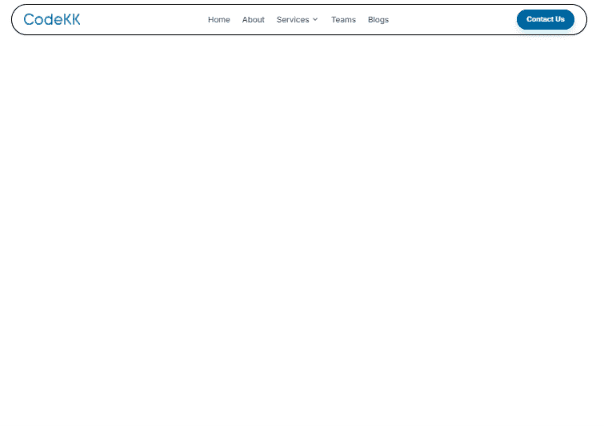
A modern responsive navbar built with Bootstrap 5.3, Bootstrap Icons, HTML, CSS, and vanilla JavaScript, with no build step and no framework required. It suits component libraries, SaaS products, developer tools, blogs, documentation sites, and dashboards. On desktop, the navbar shows: A logo on the left. Navigation links, including a two-column mega dropdown where every item has an icon, a title, and a short description, plus a second single-column dropdown. A search box with a keyboard shortcut hint. A dark mode toggle. Sign in and Upload buttons. On screens below 992px, the same markup becomes a slide-out offcanvas menu from the right: Search sits at the top, dropdowns expand in place, and the action buttons are pinned to the bottom. The menu closes automatically when a link is chosen or when the window is resized to desktop width. A custom menu button replaces the default Bootstrap toggler. The navbar sticks to the top of the page with a frosted-glass background. After the page scrolls a few pixels, it becomes slightly shorter and gains a soft shadow and border. Dark mode uses Bootstrap’s built-in `data-bs-theme`, follows the system setting by default, and remembers manual theme choices. `Ctrl+K` (`⌘+K` on Mac) or `/` focuses the search box, while on mobile it opens the menu first. The shortcut adapts to the visitor’s platform, and the current page link—and its dropdown parent, if applicable—is highlighted. The brand color is controlled by three CSS variables, with separate values for dark mode, so the whole navbar can be rebranded in seconds. Accessibility is built in: ARIA labels on every icon button. aria-current on the active link. Visible keyboard focus rings. Animations turned off when prefers-reduced-motion is enabled. It works in plain HTML sites, WordPress themes, PHP templates, and any backend that renders HTML.
Discussion
Feedback, implementation tips, and usage notes.
Comments
Sign in to join the conversation