

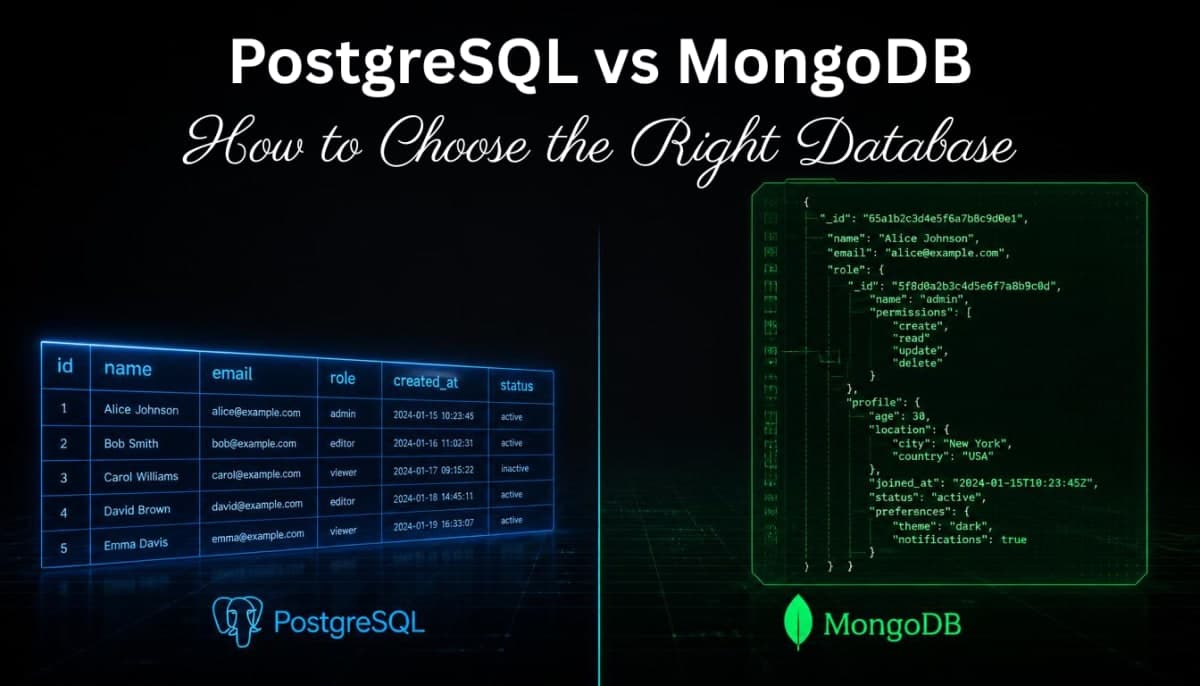
PostgreSQL vs MongoDB - How to Choose the Right Database for Your Project
PostgreSQL and MongoDB are fundamentally different databases. This guide explains how each works, how they handle relationships, schema, and transactions - so you can make the right choice instead of just going with whatever a tutorial used.
Every developer building a backend eventually hits this question. You have data to store, you need a database, and two names keep coming up - PostgreSQL and MongoDB. Someone in a tutorial uses one, someone on Reddit recommends the other, and you're left wondering which one you should actually learn and use.
This blog explains what each database actually is, how they store data differently, and gives you a clear way to think about which one fits your project. Not a "one is better" argument - because neither is universally better. Just an honest breakdown so you can make the right call.
If you've been following the backend series on codekk.dev, you've already covered
Node.js and Express, JWT authentication, and CORS. The missing piece has been the database layer - this is it.The Fundamental Difference - How They Think About Data
Before anything else, you need to understand that PostgreSQL and MongoDB are built on completely different ideas about what data looks like and how it should be stored.
PostgreSQL is a relational database. It stores data in tables - rows and columns, like a spreadsheet. Every row in a table follows the same structure. Relationships between different types of data are handled by linking tables together using keys.
MongoDB is a document database. It stores data as JSON-like documents inside collections. Each document can have a different structure. Related data can either be referenced or embedded directly inside the same document.
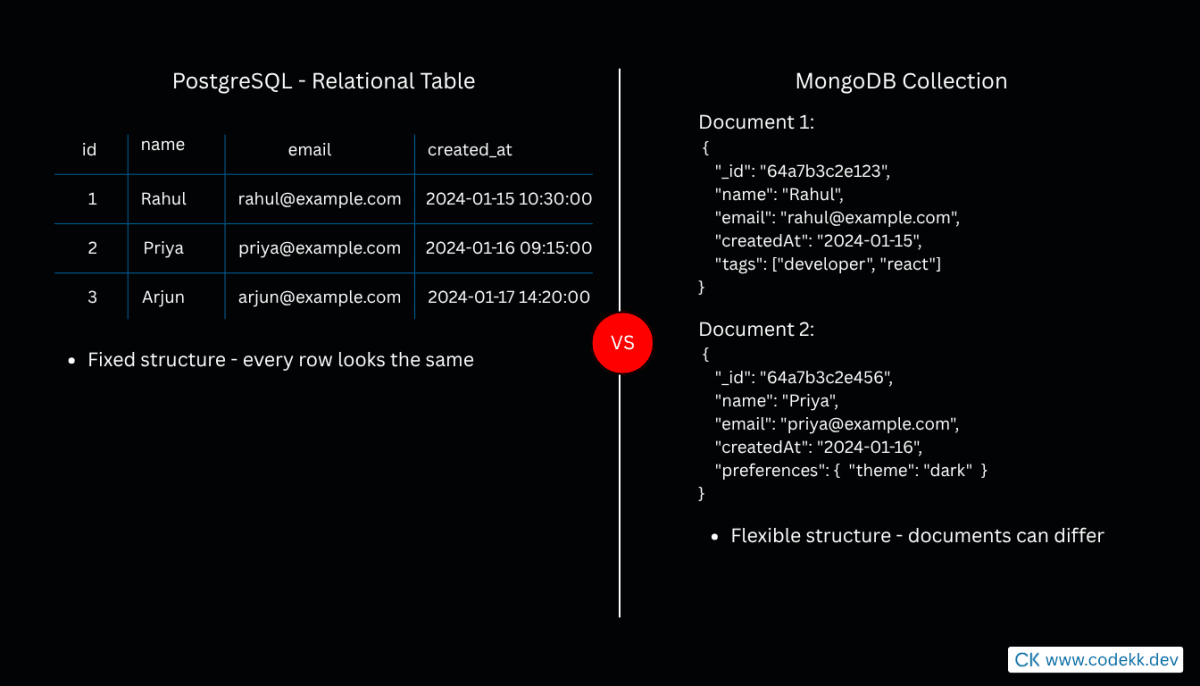
This isn't just a syntax difference. It's a fundamentally different way of thinking about your data, and it affects how you design your application from the start.
How PostgreSQL Stores Data
In PostgreSQL, before you store anything, you define a schema. A schema is a strict blueprint that says exactly what columns exist, what type of data each column holds, and which columns are required.
CREATE TABLE users (
  id SERIAL PRIMARY KEY,
  name VARCHAR(100) NOT NULL,
  email VARCHAR(255) UNIQUE NOT NULL,
  created_at TIMESTAMP DEFAULT NOW()
);

CREATE TABLE orders (
  id SERIAL PRIMARY KEY,
  user_id INTEGER REFERENCES users(id),
  total_amount DECIMAL(10, 2) NOT NULL,
  status VARCHAR(50) DEFAULT 'pending',
  created_at TIMESTAMP DEFAULT NOW()
);
Every user stored in this table will have exactly these four fields - nothing more, nothing less. If you try to insert a user without an email, PostgreSQL rejects it. If you try to add a field that doesn't exist in the schema, PostgreSQL rejects it.
The orders table has a user_id column that references the users table. This is a foreign key - it creates a formal relationship between the two tables. PostgreSQL enforces this relationship. You cannot create an order for a user that doesn't exist. If you try to delete a user who has orders, PostgreSQL will either block you or cascade the deletion depending on how you configured it.
To get a user and all their orders together, you use a JOIN:
SELECT users.name, users.email, orders.total_amount, orders.status
FROM users
JOIN orders ON users.id = orders.user_id
WHERE users.id = 1;
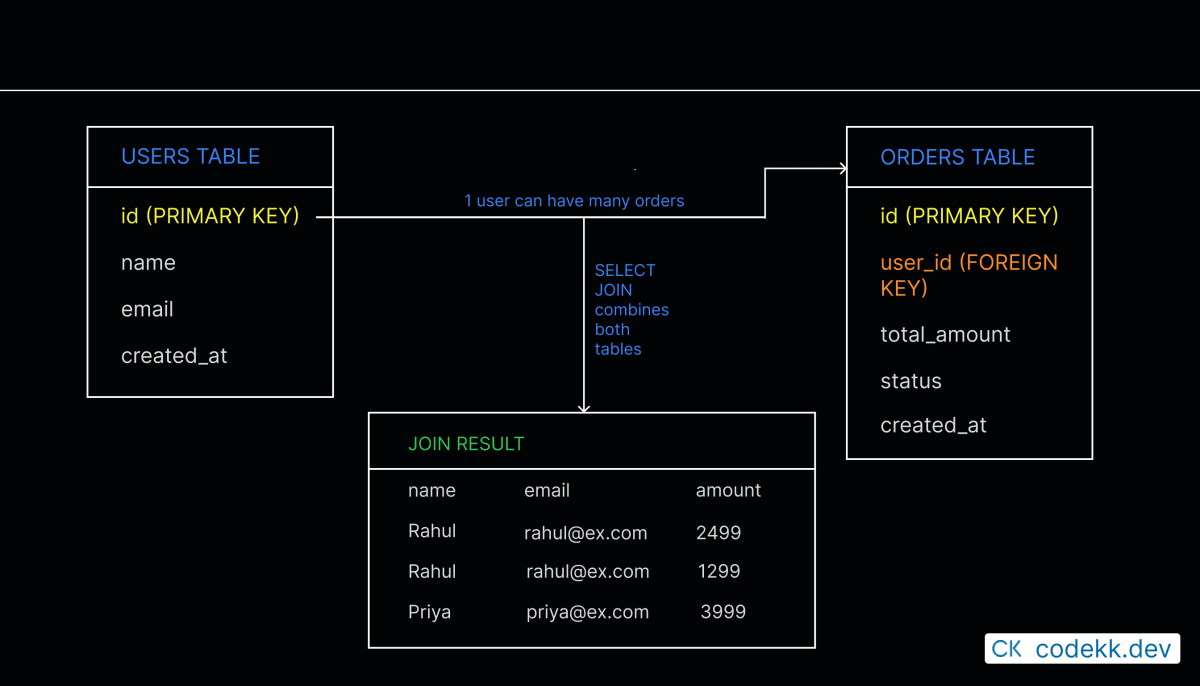
This relational model is powerful when your data has clear relationships and you need to query across those relationships in complex ways. The strict schema means your data is always consistent and predictable.
How MongoDB Stores Data
In MongoDB, there's no schema to define upfront. You create a collection and start inserting documents immediately. A document is a JSON object and it can have whatever fields you want.
// A user document in MongoDB
{
  _id: ObjectId("64a7b3c2e1234567890abcde"),
  name: "Rahul",
  email: "rahul@example.com",
  createdAt: new Date("2024-01-15"),
  preferences: {
    theme: "dark",
    language: "en"
  },
  tags: ["developer", "react"]
}
Notice a few things here. The user document has nested data inside it - preferences is an object embedded directly in the user document. tags is an array. This is natural in MongoDB.
In a relational database, preferences and tags would typically live in separate tables with their own foreign key relationships. In MongoDB you just put them inside the document because they belong to the user.
For orders, you have a choice in MongoDB. You can reference the user by their ID (similar to how SQL does it):
// Order document with a reference to the user
{
  _id: ObjectId("64a7b3c2e1234567890abcdf"),
  userId: ObjectId("64a7b3c2e1234567890abcde"),
  totalAmount: 2499,
  status: "pending",
  items: [
    { productName: "Mechanical Keyboard", quantity: 1, price: 2499 }
  ],
  createdAt: new Date("2024-01-15")
}
Or, if orders are always accessed together with the user, you could embed them directly inside the user document:
// User document with orders embedded
{
  _id: ObjectId("64a7b3c2e1234567890abcde"),
  name: "Rahul",
  email: "rahul@example.com",
  orders: [
    {
      totalAmount: 2499,
      status: "pending",
      items: [{ productName: "Mechanical Keyboard", quantity: 1, price: 2499 }]
    }
  ]
}
[IMAGE: Diagram showing a MongoDB document with nested objects and arrays embedded inside it, contrasted with the same data spread across multiple SQL tables]
The decision between referencing and embedding in MongoDB depends entirely on how you access the data. If you always need the orders when you fetch a user, embedding saves you an extra query. If orders can grow very large or are accessed independently, referencing makes more sense.
Querying - SQL vs MongoDB Query Language
This is where the day-to-day developer experience differs most noticeably.
PostgreSQL uses SQL - Structured Query Language. It's been around since the 1970s and is one of the most widely known programming interfaces in software development.
-- Get all users who signed up in the last 30 days
SELECT id, name, email
FROM users
WHERE created_at >= NOW() - INTERVAL '30 days'
ORDER BY created_at DESC;

-- Get total revenue per user
SELECT users.name, SUM(orders.total_amount) as total_spent
FROM users
JOIN orders ON users.id = orders.user_id
GROUP BY users.id, users.name
ORDER BY total_spent DESC;
MongoDB has its own query language based on JavaScript objects:
// Get all users who signed up in the last 30 days
db.users.find({
  createdAt: { $gte: new Date(Date.now() - 30 * 24 * 60 * 60 * 1000) }
}).sort({ createdAt: -1 });

// Get total spent per user (using aggregation pipeline)
db.orders.aggregate([
  {
    $group: {
      _id: "$userId",
      totalSpent: { $sum: "$totalAmount" }
    }
  },
  { $sort: { totalSpent: -1 } }
]);
SQL is more readable for complex queries involving multiple tables. MongoDB's aggregation pipeline is powerful but has a steeper learning curve for complex operations. For simple queries, both feel comparable.
Schema Flexibility - A Feature and a Risk
MongoDB's schema flexibility is often presented as a major advantage, and it genuinely can be. During early development when your data model is still changing, not having to write migrations every time you add a field is genuinely convenient.
But flexibility has a cost. Without a schema enforced at the database level, the responsibility for data consistency falls entirely on your application code. If one part of your code saves a user with an email field and another part accidentally saves with emailAddress, both are valid in MongoDB. Your database will happily store inconsistent data and you'll only discover the problem when your code breaks trying to read it.
PostgreSQL's strictness feels limiting at first. Adding a new column to a table requires a migration. Changing a column type requires careful planning. But this strictness is also what guarantees that every row in your table looks exactly the way you expect it to. Your data is consistent by definition.
[IMAGE: Split diagram - left side shows MongoDB collection with documents having inconsistent field names (email vs emailAddress vs e_mail) with a warning icon. Right side shows a PostgreSQL table where all rows have consistent columns with a checkmark icon]
Most teams working with MongoDB end up adding a schema validation layer in their application code anyway - using libraries like Mongoose which adds schemas on top of MongoDB. At that point you have the flexibility of MongoDB with schema enforcement added back in through your ORM. It works, but it's worth knowing you're solving a problem that PostgreSQL doesn't have in the first place.
Transactions - When They Matter
A transaction is a way to group multiple database operations so they either all succeed or all fail together. This matters enormously in certain situations.
Consider a bank transfer. You're moving money from Account A to Account B. That's two operations - deduct from A, add to B. If the first operation succeeds and then something fails before the second one completes, Account A lost money that never arrived in Account B. Without transactions, this is a real risk.
PostgreSQL has had full ACID transaction support since the beginning. Wrapping multiple operations in a transaction is straightforward:
BEGIN;
  UPDATE accounts SET balance = balance - 1000 WHERE id = 1;
  UPDATE accounts SET balance = balance + 1000 WHERE id = 2;
COMMIT;
If anything fails between BEGIN and COMMIT, the entire thing rolls back as if nothing happened.
MongoDB added multi-document transaction support in version 4.0, so it does support transactions now. But they come with performance overhead and are generally considered a workaround in MongoDB - if you find yourself needing frequent multi-document transactions, it often means your data model would work better in a relational database.
Performance - It Depends on What You're Doing
Neither database is faster in absolute terms. Performance depends heavily on your data access patterns.
MongoDB tends to perform well when you're reading and writing single documents that contain all the data you need. Because related data is often embedded, you're doing fewer queries. Reading a user with all their preferences and recent activity in one document query is fast.
PostgreSQL tends to perform well for complex queries across multiple tables, especially with proper indexing. Its query planner is sophisticated and can optimize JOINs and aggregations efficiently. For analytical queries or reporting where you're aggregating data across the whole database, PostgreSQL typically has an edge.
For most web applications, both will perform well within your expected load. The performance difference rarely matters until you're at significant scale, at which point you'll have enough engineering resources to address it properly. Don't make your database choice based on hypothetical future scale - make it based on your current data model and access patterns.
When PostgreSQL is the Right Choice
PostgreSQL makes sense when:
Your data has clear relationships that you need to query across. A user has orders, orders have items, items have products - that relational structure is exactly what PostgreSQL was designed for.
Data consistency is critical. Financial applications, healthcare data, anything where you cannot afford inconsistent or corrupt data belongs in a relational database with proper constraints and transactions.
You're doing complex reporting or analytics. SQL is genuinely excellent for aggregation, grouping, and cross-table queries. If your app needs to generate reports across your data, PostgreSQL will serve you better.
Your schema is stable and well-defined. If you know what your data looks like and it's not going to change dramatically, the strictness of PostgreSQL works in your favor.
When MongoDB is the Right Choice
MongoDB makes sense when:
Your data is naturally document-shaped. If you're storing things like product catalogs where each product has wildly different attributes, or user-generated content that varies in structure, the document model fits naturally.
You're prototyping or iterating quickly. During early development when your data model is still evolving, MongoDB lets you move fast without writing migrations constantly.
You're storing hierarchical or nested data. If your data has a lot of nesting and you always access it together, embedding in MongoDB is cleaner than managing multiple joined tables.
You're working with content-heavy applications like CMS platforms, blogs, or catalog systems where the content structure varies and relations are simple.
The Honest Summary
[IMAGE: Clean comparison table showing PostgreSQL vs MongoDB across key dimensions - data model, schema, transactions, query language, best for, and flexibility]
PostgreSQL is the safer default for most applications. It's been battle-tested for decades, has excellent tooling, enforces data integrity at the database level, and SQL is a skill that transfers everywhere. If you're not sure which one to pick, PostgreSQL is the lower-risk choice.
MongoDB is genuinely good for what it's designed for - flexible, document-shaped data where the structure varies and relations are simple. It's not a "beginner" database or a "worse" one, just a different tool for a different kind of problem.
The mistake most developers make is picking one based on which tutorial they happened to follow first. Pick based on your data. Sketch out what your data actually looks like and how you'll query it. If it naturally fits in tables with clear relationships, use PostgreSQL. If it naturally fits in nested documents with varying structure, use MongoDB.
Both are excellent databases. The decision matters a lot less than people make it out to be as long as you make it consciously.
Related Articles
More insights you might enjoy

SSR, CSR, SSG, and ISR in Next.js - What They Are and When to Use Each One
Next.js gives you four ways to render pages and each solves a different problem. This guide explains all four with real code examples and a practical decision guide.

HTTP Status Codes Explained - What They Actually Mean and Why Developers Should Know Them
Most developers know 200 and 404. But understanding the full range - and when to use them in your own APIs - makes you a noticeably better backend developer.

React vs Next.js: What's Actually Different and When to Use Which
React and Next.js are often confused - one is a UI library, the other is a full framework built on top of it. This post breaks down the real differences: rendering strategies, routing, API routes, and when to pick one over the other.

How React's useEffect Actually Works - And Why Developers Misuse It
useEffect is one of the most used hooks in React and also one of the most misunderstood. This guide covers the dependency array, cleanup functions, the double render, and common mistakes that cause bugs.
Node.js and Express.js - What They Are, How They Differ, and How They Work Together
Node.js and Express.js are not the same thing. This guide explains what each does, how they work together, and covers routing, middleware, and error handling with real code.
How the JavaScript Event Loop Actually Works - A Deep Dive
A complete deep dive into the JavaScript event loop - the call stack, callback queue, microtask queue, and how they work together to make async JavaScript possible.
Comments
Sign in to join the conversation