

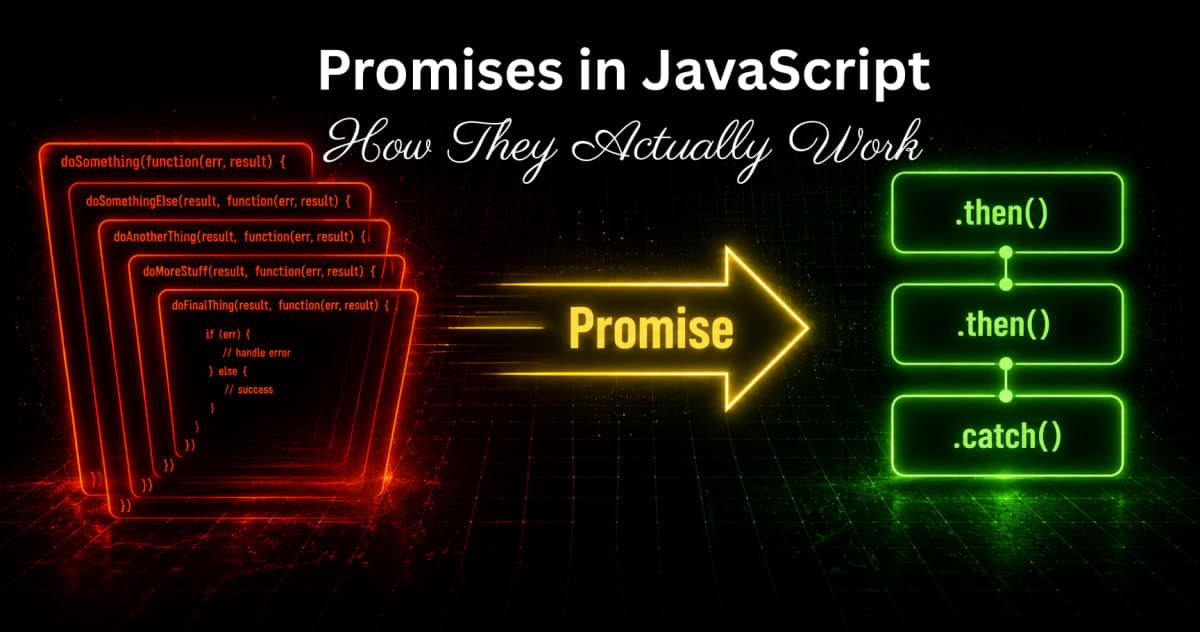
Promises in JavaScript - How They Actually Work
Learn how JavaScript Promises actually work - the three states, chaining, error handling, Promise.all, race, any, and how they connect to async/await.
If you have read the
callbacks blog on codekk.dev, you already know the problem. Sequential async operations with callbacks turn into deeply nested pyramids that are hard to read, hard to maintain, and painful to debug. Promises were created specifically to fix that.But most developers learn just enough about Promises to use .then() and .catch() and move on. They do not really understand what a Promise object is, what states it goes through, how chaining actually works, or why error handling behaves the way it does.
This blog covers all of that properly. By the end, you will not just know how to use Promises - you will understand what they actually are and why they work the way they do. And when you get to async/await after this, it will make complete sense because async/await is just Promises with cleaner syntax underneath.
What a Promise Actually Is
A Promise is an object that represents the eventual result of an async operation. It is a placeholder for a value that does not exist yet but will exist at some point in the future - or will fail trying.
Think of it like ordering food at a restaurant. When you order, the waiter does not disappear and come back only when the food is ready while making you stand at the counter. They give you a token - a promise that your food will come. You go sit down and do other things. When the food is ready, it gets delivered to you.
In JavaScript terms:
The token is the Promise object
Sitting down and doing other things is your code continuing to run
The food arriving is the Promise resolving
The kitchen running out of ingredients is the Promise rejecting
const foodPromise = orderFood("Biryani"); // returns a Promise immediately

// You do not wait here - code continues
console.log("Sitting down...");
console.log("Checking phone...");

// When food is ready, this runs
foodPromise.then(food => {
  console.log("Food arrived:", food);
}).catch(err => {
  console.log("Order failed:", err.message);
});
The Promise object is returned immediately. The actual value comes later.
The Three States of a Promise
Every Promise is always in exactly one of three states. Understanding these states is the foundation of understanding how Promises work.
[IMAGE: Diagram showing three states of a Promise - "Pending" in yellow center circle with arrows pointing to "Fulfilled" in green on the right and "Rejected" in red on the left. One-way arrows showing you can only go from Pending to either Fulfilled or Rejected, never back. Labels: "resolve() called" on the arrow to Fulfilled, "reject() called" on the arrow to Rejected]
Pending - the initial state. The async operation has started but has not completed yet. The Promise is waiting.
Fulfilled - the operation completed successfully. The Promise now has a value. Your .then() callback runs.
Rejected - the operation failed. The Promise has a reason for failure. Your .catch() callback runs.
Once a Promise moves from Pending to either Fulfilled or Rejected, it is settled and can never change state again. A fulfilled Promise will always be fulfilled with the same value. A rejected Promise will always be rejected with the same reason.
const promise = new Promise((resolve, reject) => {
  setTimeout(() => {
    resolve("Success!"); // moves to Fulfilled
    resolve("Another value"); // ignored - already settled
    reject("Error"); // ignored - already settled
  }, 1000);
});
This immutability is important - it means you can safely pass a Promise around and attach multiple handlers to it without worrying about the state changing unexpectedly.
Creating a Promise - The Promise Constructor
You create a Promise using the new Promise() constructor. It takes one function as an argument - called the executor function. The executor runs immediately and receives two functions: resolve and reject.
const myPromise = new Promise((resolve, reject) => {
  // This runs immediately when the Promise is created

  const success = true;

  if (success) {
    resolve("Operation completed successfully"); // fulfills the Promise
  } else {
    reject(new Error("Something went wrong")); // rejects the Promise
  }
});
Call resolve(value) when the operation succeeds. Call reject(error) when it fails. Only the first call matters - any subsequent calls to either resolve or reject are ignored because the Promise is already settled.
A real async example - wrapping setTimeout in a Promise:
function delay(ms) {
  return new Promise((resolve) => {
    setTimeout(() => {
      resolve(`Done after ${ms}ms`);
    }, ms);
  });
}

delay(2000).then(message => {
  console.log(message); // "Done after 2000ms" - appears after 2 seconds
});

console.log("This runs immediately");
Wrapping a callback-based function in a Promise:
This is called promisification - converting an older callback-based API into a Promise-based one.
const fs = require("fs");

// Old callback style
function readFileCallback(path, callback) {
  fs.readFile(path, "utf8", callback);
}

// Promisified version
function readFilePromise(path) {
  return new Promise((resolve, reject) => {
    fs.readFile(path, "utf8", (err, data) => {
      if (err) {
        reject(err); // error goes to reject
      } else {
        resolve(data); // data goes to resolve
      }
    });
  });
}

// Now you can use it with .then() and .catch()
readFilePromise("users.txt")
  .then(data => console.log(data))
  .catch(err => console.error(err));
Node.js actually has a built-in utility for this called util.promisify that does exactly the same conversion automatically for any error-first callback function.
Using a Promise - then, catch, finally
Once you have a Promise, you use three methods to handle its outcome.
.then(onFulfilled, onRejected)
.then() takes up to two arguments - a function to run when the Promise fulfills and an optional function to run when it rejects.
fetchUser(1)
  .then(
    (user) => console.log("Got user:", user),   // runs on success
    (err) => console.error("Failed:", err)       // runs on failure
  );
In practice, most developers only pass the success handler to .then() and use .catch() separately for errors. It is cleaner.
.catch(onRejected)
.catch() handles rejections. It is shorthand for .then(undefined, onRejected).
fetchUser(1)
  .then(user => console.log("Got user:", user))
  .catch(err => console.error("Failed:", err));
.finally(onFinally)
.finally() runs no matter what - whether the Promise fulfilled or rejected. Useful for cleanup like hiding a loading spinner.
showLoadingSpinner();

fetchUser(1)
  .then(user => displayUser(user))
  .catch(err => showError(err))
  .finally(() => hideLoadingSpinner()); // always runs
.finally() receives no arguments - it does not know whether the Promise succeeded or failed. It just knows it is settled.
Promise Chaining - The Real Power
This is what makes Promises genuinely better than callbacks. When you return a value from a .then() callback, it gets wrapped in a new Promise. This lets you chain multiple async operations in a flat, readable sequence instead of nesting them.
fetchUser(1)
  .then(user => {
    console.log("Got user:", user.name);
    return fetchOrders(user.id); // return a new Promise
  })
  .then(orders => {
    console.log("Got orders:", orders.length);
    return sendEmail(orders);  // return another Promise
  })
  .then(result => {
    console.log("Email sent:", result);
  })
  .catch(err => {
    console.error("Something failed:", err); // catches errors from any step
  });
Compare this to the callback hell version from the
callbacks blog. The logic is exactly the same but the structure is flat. You read it top to bottom like a series of steps. One.catch() at the end handles errors from any step in the chain.[IMAGE: Side by side comparison - left shows callback hell pyramid (deeply nested, hard to read), right shows the same logic as a flat Promise chain (clean, readable top to bottom). Arrow between them labeled "Same logic, different structure"]
What gets passed through the chain:
Promise.resolve(1)
  .then(val => val + 1)     // receives 1, returns 2
  .then(val => val * 3)     // receives 2, returns 6
  .then(val => val - 1)     // receives 6, returns 5
  .then(val => console.log(val)); // receives 5, logs 5
Each .then() receives whatever the previous one returned. If you return a plain value, it gets passed directly. If you return a Promise, the next .then() waits for that Promise to resolve and receives its value.
Error Handling in Promise Chains
Errors in Promise chains deserve special attention because they behave differently from synchronous try/catch.
When any step in a chain throws an error or rejects, the chain skips all remaining .then() handlers and jumps straight to the next .catch().
fetchUser(1)
  .then(user => {
    throw new Error("Something broke here"); // this error is caught below
  })
  .then(orders => {
    console.log("This never runs");
  })
  .then(result => {
    console.log("This never runs either");
  })
  .catch(err => {
    console.error("Caught:", err.message); // "Caught: Something broke here"
  });
You can also recover from errors mid-chain by returning a value from .catch():
fetchUser(999) // user does not exist - will reject
  .then(user => fetchOrders(user.id))
  .catch(err => {
    console.log("User not found, using default");
    return { id: 0, orders: [] }; // recover with a default value
  })
  .then(data => {
    console.log("Continuing with:", data); // chain continues here
  });
When .catch() returns a value, the chain continues with that value as if nothing went wrong. This lets you handle specific errors gracefully and continue the chain instead of stopping entirely.
[IMAGE: Diagram showing Promise chain with an error - first .then() runs fine (green), second .then() throws error (red with lightning bolt), third and fourth .then() are skipped (gray with skip arrows), .catch() at the bottom catches it (orange). Label: "Error skips remaining .then() handlers and goes straight to .catch()"]
Promise.all - Running Multiple Promises in Parallel
Sometimes you have multiple async operations that do not depend on each other and you want to run them at the same time instead of one by one.
// Sequential - slow (waits for each one)
const user = await fetchUser(1);        // waits 300ms
const orders = await fetchOrders(1);    // then waits 300ms
const products = await fetchProducts(); // then waits 300ms
// Total: ~900ms

// Parallel with Promise.all - fast (all run at the same time)
const [user, orders, products] = await Promise.all([
  fetchUser(1),
  fetchOrders(1),
  fetchProducts()
]);
// Total: ~300ms (waits for the slowest one)
Promise.all takes an array of Promises and returns a new Promise that:
Fulfills when ALL Promises in the array fulfill - with an array of their results in the same order
Rejects immediately when ANY Promise in the array rejects - with that rejection reason
Promise.all([
  fetchUser(1),
  fetchOrders(1),
  fetchProducts()
])
  .then(([user, orders, products]) => {
    // all three are ready here
    console.log(user, orders, products);
  })
  .catch(err => {
    // if any one of them fails, we end up here
    console.error("One of the requests failed:", err);
  });
The "fail fast" behavior of Promise.all is important to know. If you have three requests and the second one fails, you immediately get the rejection. The third request might still be running but you will never get its result through this Promise.
Promise.allSettled - When You Want All Results Regardless
Sometimes you want all results even if some fail. Promise.allSettled waits for all Promises to settle (fulfill or reject) and gives you the outcome of each one.
Promise.allSettled([
  fetchUser(1),
  fetchUser(999),  // this one will fail - user does not exist
  fetchUser(2)
]).then(results => {
  results.forEach(result => {
    if (result.status === "fulfilled") {
      console.log("Success:", result.value);
    } else {
      console.log("Failed:", result.reason);
    }
  });
});
Each item in the results array has a status of either "fulfilled" or "rejected", and either a value (on success) or reason (on failure). No short-circuiting - you always get all results.
Promise.race - First One Wins
Promise.race takes an array of Promises and resolves or rejects as soon as the first one settles, with that Promise's value or reason.
// Useful for timeouts - reject if API takes too long
function fetchWithTimeout(url, timeoutMs) {
  const fetchPromise = fetch(url);

  const timeoutPromise = new Promise((_, reject) => {
    setTimeout(() => {
      reject(new Error(`Request timed out after ${timeoutMs}ms`));
    }, timeoutMs);
  });

  return Promise.race([fetchPromise, timeoutPromise]);
}

fetchWithTimeout("https://api.example.com/users", 3000)
  .then(response => response.json())
  .then(data => console.log(data))
  .catch(err => console.error(err.message));
If the fetch completes in under 3 seconds, fetchPromise wins the race and you get the response. If it takes longer, timeoutPromise wins and you get a timeout error.
Promise.any - First Successful One Wins
Promise.any is like Promise.race but it only cares about the first fulfillment, not the first settlement. It ignores rejections unless all Promises reject.
// Try multiple API endpoints - use whichever responds first successfully
Promise.any([
  fetch("https://api1.example.com/data"),
  fetch("https://api2.example.com/data"),
  fetch("https://api3.example.com/data")
])
  .then(response => response.json())
  .then(data => console.log("Got data from fastest server:", data))
  .catch(err => console.error("All servers failed:", err));
If the first two fail but the third succeeds, you get the third one's result. Only if all three fail do you get a rejection.
[IMAGE: Comparison table of Promise.all, Promise.allSettled, Promise.race, Promise.any - showing what each one does when promises succeed vs fail, and what it returns. Dark background table with color coded rows]
Promise.resolve and Promise.reject
These are shorthand ways to create already-settled Promises.
// Creates a Promise that is already fulfilled with this value
Promise.resolve("immediate value")
  .then(val => console.log(val)); // "immediate value"

// Creates a Promise that is already rejected with this error
Promise.reject(new Error("immediate failure"))
  .catch(err => console.error(err.message)); // "immediate failure"
These are useful when you need to return a Promise from a function but already have the value available synchronously:
function getUser(id) {
  // Check cache first
  if (cache.has(id)) {
    return Promise.resolve(cache.get(id)); // return immediately, but as a Promise
  }

  // Otherwise fetch from API
  return fetch(`/api/users/${id}`).then(r => r.json());
}

// Caller always gets a Promise, whether data was cached or not
getUser(1).then(user => console.log(user));
Common Mistakes With Promises
Forgetting to return inside .then():
// Bug - nothing is chained
fetchUser(1)
  .then(user => {
    fetchOrders(user.id); // forgot to return!
  })
  .then(orders => {
    console.log(orders); // undefined - the Promise was not returned
  });

// Correct
fetchUser(1)
  .then(user => {
    return fetchOrders(user.id); // return the Promise
  })
  .then(orders => {
    console.log(orders); // actual orders data
  });
If you forget return inside .then(), the next .then() receives undefined instead of the resolved value. This is one of the most common Promise bugs.
Not catching errors:
// Bug - if this rejects, you get an UnhandledPromiseRejection warning
fetchUser(1)
  .then(user => console.log(user));

// Always add .catch()
fetchUser(1)
  .then(user => console.log(user))
  .catch(err => console.error(err));
Unhandled Promise rejections will crash your Node.js server in newer versions. Always add a .catch() at the end of every Promise chain.
Creating unnecessary Promise wrappers:
// Unnecessary - fetch already returns a Promise
function getUser(id) {
  return new Promise((resolve, reject) => {
    fetch(`/api/users/${id}`)
      .then(r => r.json())
      .then(resolve)
      .catch(reject);
  });
}

// Just return the Promise directly
function getUser(id) {
  return fetch(`/api/users/${id}`).then(r => r.json());
}
Only use new Promise() when you are wrapping something that does not already return a Promise - like a callback-based function. If it already returns a Promise, just chain on it directly.
How Promises Connect to Async/Await
Every async function returns a Promise. Every await expression waits for a Promise to settle. Async/await is not a separate concept - it is syntax sugar built directly on top of Promises.
// Promise chain version
function loadUserData(id) {
  return fetchUser(id)
    .then(user => fetchOrders(user.id)
      .then(orders => ({ user, orders }))
    )
    .catch(err => console.error(err));
}

// Async/await version - same thing, more readable
async function loadUserData(id) {
  try {
    const user = await fetchUser(id);
    const orders = await fetchOrders(user.id);
    return { user, orders };
  } catch (err) {
    console.error(err);
  }
}
Under the hood, the async/await version is doing exactly what the Promise chain is doing. The JavaScript engine converts await into .then() calls. Knowing Promises properly means you understand what async/await is actually doing, which makes debugging async code significantly easier.
If you have read the
event loop blog on codekk.dev, you also know that.then() callbacks go into the Microtask Queue - which is why Promise callbacks run before setTimeout callbacks even with zero delay. That same mechanism is what makes await work the way it does.The Mental Model Worth Keeping
A Promise is a box that says "a value is coming." It starts empty (Pending), then either gets filled with a value (Fulfilled) or gets marked as failed (Rejected). Once it is one of those two, it never changes.
.then() says "when the box gets filled, do this with the value." .catch() says "when the box gets marked failed, do this." .finally() says "when the box is done either way, do this."
Chaining works because each .then() returns a new box. You are building a pipeline of boxes, each one waiting for the previous one to fill up before it starts.
Promises did not solve the fundamental challenge of async JavaScript - that is still handled by the event loop. What they solved is how you write code that deals with async results. Instead of nested callbacks, you get a flat pipeline. Same mechanics, much cleaner code.The yellow color for Promises connects intentionally to the "Pending" state which is the default starting state of every Promise. If your blog has syntax highlighting or callout boxes, using yellow for Promise-related terms, green for resolve/fulfill, and red for reject/error creates a color language that matches both the thumbnail and the mental model explained in the blog.
Related Articles
More insights you might enjoy
SSR, CSR, SSG, and ISR in Next.js - What They Are and When to Use Each One
Next.js gives you four ways to render pages and each solves a different problem. This guide explains all four with real code examples and a practical decision guide.

HTTP Status Codes Explained - What They Actually Mean and Why Developers Should Know Them
Most developers know 200 and 404. But understanding the full range - and when to use them in your own APIs - makes you a noticeably better backend developer.
Async/Await in JavaScript - How It Actually Works and Why It Exists
How async/await works in JavaScript - async functions, await, error handling, parallel vs sequential execution, and the most common mistakes explained.

JavaScript Closures - The Concept Interviewers Actually Test
Closures are one of the most asked-about JavaScript concepts in interviews, and also one of the most misunderstood. This blog explains what a closure actually is, why functions can remember variables from outside their own scope, and where closures show up in real code

Higher-Order Functions in JavaScript
Higher-order functions are one of the most important ideas in JavaScript, and you're probably already using them without realizing it. This blog explains what makes a function "higher-order," why they matter, and how methods like map, filter, and setTimeout all rely on this same simple idea.

React vs Next.js: What's Actually Different and When to Use Which
React and Next.js are often confused - one is a UI library, the other is a full framework built on top of it. This post breaks down the real differences: rendering strategies, routing, API routes, and when to pick one over the other.
Comments
Sign in to join the conversation