Home/Blog/How the JavaScript Event Loop Actually Works - A Deep Dive
How the JavaScript Event Loop Actually Works - A Deep Dive
11 min readJun 19, 2026

How the JavaScript Event Loop Actually Works - A Deep Dive

A complete deep dive into the JavaScript event loop - the call stack, callback queue, microtask queue, and how they work together to make async JavaScript possible.

0 views0 likes0 comments0 bookmarks

How the JavaScript Event Loop Actually Works - A Deep Dive

If you've been writing JavaScript for a while, you've probably heard the phrase "JavaScript is single threaded." And if you've read our blog on synchronous and asynchronous in Node.js, you already know that JavaScript handles async tasks without blocking everything else.

But here's the question most tutorials stop short of answering: if JavaScript can only do one thing at a time, how does it handle a timer, a fetch call, and a user click all seemingly at the same time without freezing?

The answer is the Event Loop. And once you truly understand it, a lot of things about JavaScript that felt confusing or unpredictable will suddenly make complete sense.


The Problem the Event Loop Solves

Let's set the stage properly.

JavaScript runs on a single thread. That means it has one call stack, one piece of code running at any given moment. There's no parallel execution happening inside JavaScript itself.

But your browser or Node.js server needs to handle multiple things at the same time - responding to clicks, fetching data, running timers, handling multiple incoming requests. If JavaScript truly blocked on every slow operation, no web app would be usable.

The Event Loop is the mechanism that lets JavaScript appear to handle multiple things concurrently, even though it's technically doing one thing at a time. It does this by being very smart about how it manages waiting time.


The Moving Parts - What You Need to Know First

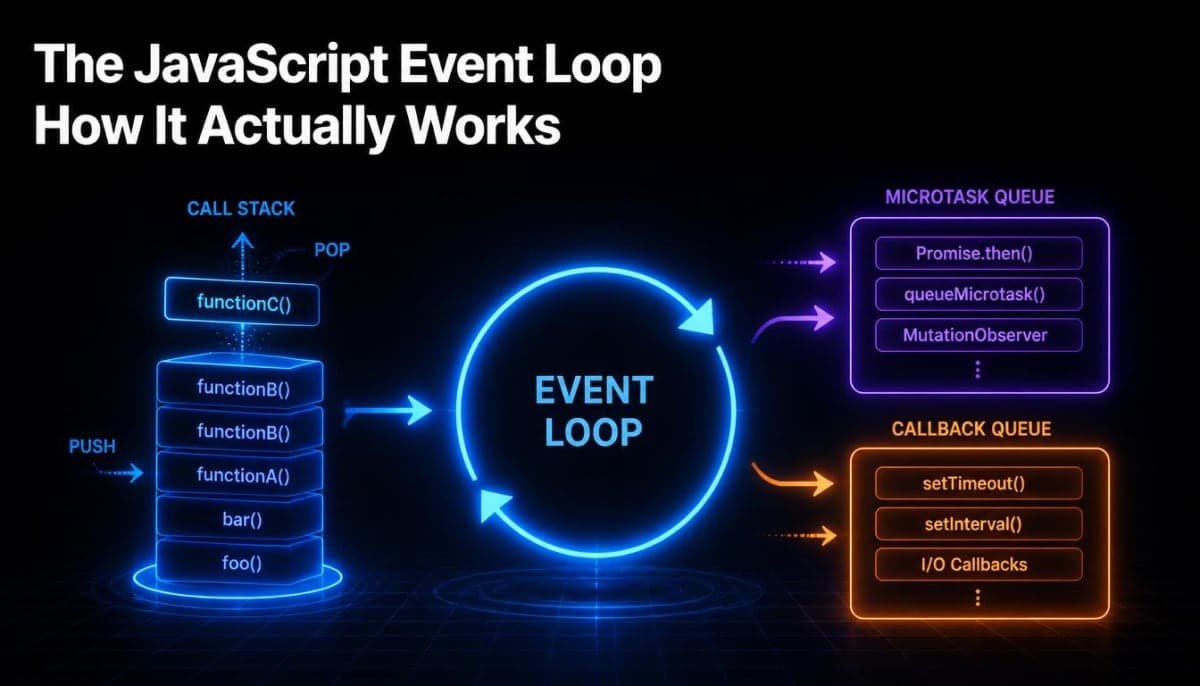
Before explaining how the event loop works, you need to know the pieces it works with. There are four of them.

The Call Stack

This is where your JavaScript code actually executes. Every time you call a function, it gets pushed onto the call stack. When that function returns, it gets popped off. JavaScript executes whatever is at the top of the stack.

function greet(name) {
  return `Hello, ${name}`;
}

function main() {
  const message = greet("Rahul");
  console.log(message);
}

main();

Here's what happens on the call stack step by step:

1. main() is pushed onto the stack
2. greet("Rahul") is pushed onto the stack
3. greet() returns "Hello, Rahul" and is popped off
4. console.log() is pushed onto the stack
5. console.log() finishes and is popped off
6. main() finishes and is popped off
7. Stack is empty

Simple, predictable, top to bottom. The issue is that some things take time - and if a slow operation sat on the call stack, nothing else could run until it finished.

Web APIs / Node.js APIs

These are capabilities provided by the environment JavaScript is running in, not by JavaScript itself. Things like setTimeout, fetch, file system operations, DOM event listeners - these are not part of the JavaScript language. They're provided by the browser or Node.js, and crucially, they run outside the call stack.

When JavaScript hits a setTimeout or a fetch, it hands that task off to the browser/Node.js API layer and immediately moves on. The API handles the waiting. JavaScript's call stack is free.

The Callback Queue (also called the Task Queue or Macrotask Queue)

When a Web API finishes its work - a timer fires, a fetch returns, a user clicks something - it doesn't immediately put code back on the call stack. Instead, it places the associated callback into the Callback Queue. It waits there until the call stack is empty.

The Microtask Queue

This is a separate, higher priority queue. Promises and certain other operations use this queue instead of the Callback Queue. The difference in priority is important - we'll get to that shortly.


How the Event Loop Ties All of This Together

The Event Loop has one job: check if the call stack is empty, and if it is, take something from one of the queues and push it onto the stack.

That's it. That's the event loop. It's a loop that keeps checking:

Is the call stack empty?
  - Yes: is there anything in the Microtask Queue? 
      - Yes: push it to the call stack and run it
      - No: is there anything in the Callback Queue?
          - Yes: push it to the call stack and run it
  - No: wait, check again

This loop runs continuously. It never stops. Every tick of this loop is one cycle - check the stack, check the queues, push something if available, repeat.


Seeing It in Action - setTimeout

Let's trace through a real example:

console.log("1 - Start");

setTimeout(() => {
  console.log("2 - Inside timeout");
}, 0);

console.log("3 - End");

Most beginners expect this to print 1, 2, 3 because they see a zero millisecond delay and think "that's instant." But the actual output is:

1 - Start
3 - End
2 - Inside timeout

Here's exactly what happens:

  1. console.log("1 - Start") is pushed to the call stack, runs, logs "1 - Start", gets popped off

  2. setTimeout(callback, 0) is pushed to the call stack. JavaScript sees it's a Web API call, hands the callback and the timer to the browser API layer, and immediately pops setTimeout off the stack

  3. The browser starts a 0ms timer (it's nearly instant but still async)

  4. console.log("3 - End") is pushed to the stack, runs, logs "3 - End", gets popped off

  5. The call stack is now empty

  6. The browser's timer finishes, puts the callback into the Callback Queue

  7. The Event Loop sees the call stack is empty and the Callback Queue has something - it pushes the callback to the call stack

  8. The callback runs, logs "2 - Inside timeout", gets popped off

The zero milliseconds doesn't mean "run immediately." It means "run as soon as possible after the current call stack is empty." That distinction matters a lot in practice.


The Microtask Queue - Why Promises Behave Differently

Now here's where it gets more interesting. Not all async callbacks go to the same queue.

Promises use the Microtask Queue, which has higher priority than the Callback Queue. After every task that runs on the call stack, the event loop completely drains the Microtask Queue before it even looks at the Callback Queue.

If you've read our blog on synchronous and asynchronous in Node.js and you've used Promises or async/await, this is why they behave the way they do under the hood.

console.log("1 - Start");

setTimeout(() => {
  console.log("2 - setTimeout");
}, 0);

Promise.resolve().then(() => {
  console.log("3 - Promise");
});

console.log("4 - End");

Output:

1 - Start
4 - End
3 - Promise
2 - setTimeout

Let's trace through this:

  1. console.log("1 - Start") runs immediately - call stack

  2. setTimeout callback gets handed to the browser API, will go to the Callback Queue when timer fires

  3. Promise.resolve().then(callback) - the promise is already resolved, so the callback goes straight to the Microtask Queue

  4. console.log("4 - End") runs immediately - call stack

  5. Call stack is now empty

  6. Event Loop checks the Microtask Queue first - finds the Promise callback, runs it, logs "3 - Promise"

  7. Microtask Queue is now empty

  8. Event Loop checks the Callback Queue - finds the setTimeout callback, runs it, logs "2 - setTimeout"

The Promise ran before the setTimeout even though both were async. This isn't random - it's because of the queue priority. Microtasks always go before macrotasks (callback queue items).


Async/Await Is Just Promises in Disguise

If you use async/await (which we covered in detail in our sync and async Node.js blog), you're still dealing with the Microtask Queue. await is essentially Promise.then written in a more readable way.

async function fetchData() {
  console.log("1 - Before await");
  
  const result = await Promise.resolve("data");
  
  console.log("3 - After await:", result);
}

console.log("Start");
fetchData();
console.log("2 - After calling fetchData");

Output:

Start
1 - Before await
2 - After calling fetchData
3 - After await: data

When JavaScript hits the await keyword, the async function pauses and returns control to the caller. Whatever comes after await inside that function is essentially a .then() callback waiting in the Microtask Queue. The code outside the function ("2 - After calling fetchData") runs first because it's still on the main call stack. Once the call stack clears, the continuation of the async function runs from the Microtask Queue.

This is why in Next.js Server Components (which we covered in the SSR, CSR, SSG, and ISR blog), async components work the way they do - the await inside them pauses that component's execution while the rest of the rendering pipeline continues.


A More Complex Example - Putting It All Together

Here's an example that combines everything, the kind that shows up in JavaScript interviews and genuinely tests whether you understand the event loop:

console.log("1");

setTimeout(() => console.log("2"), 0);

Promise.resolve()
  .then(() => {
    console.log("3");
    setTimeout(() => console.log("4"), 0);
  })
  .then(() => console.log("5"));

setTimeout(() => console.log("6"), 0);

console.log("7");

Before reading the answer, take a moment and try to trace through it using what you know now.

Output:

1
7
3
5
2
6
4

Here's why:

  • 1 and 7 run synchronously on the call stack first

  • Two setTimeout callbacks (for 2 and 6) go to the Callback Queue

  • The first Promise .then callback (for 3) goes to the Microtask Queue

  • Call stack empties

  • Microtask Queue runs first - 3 logs. Inside that callback, a new setTimeout for 4 is registered, going to the Callback Queue

  • The .then(() => console.log("5")) chained on the same Promise goes to the Microtask Queue next

  • Microtask Queue runs - 5 logs

  • Microtask Queue is now empty

  • Callback Queue runs - 2 then 6 then 4 in the order they were added

Notice that 4 comes after 6 even though the Promise that created the 4 setTimeout ran before 6's setTimeout was registered. By the time the Microtask Queue finished and we started draining the Callback Queue, 2 and 6 were already sitting there waiting, so they ran first.


Why This Matters in Node.js Specifically

In a browser, a blocked call stack means your UI freezes. In Node.js, a blocked call stack means your entire server stops responding to every other request while it waits.

This is why synchronous operations in request handlers are so dangerous in Node.js - something we explained in the Node.js and Express blog.

// This blocks the entire event loop
app.get("/users", (req, res) => {
  const data = fs.readFileSync("users.json"); // synchronous - blocks everything
  res.json(JSON.parse(data));
});

// This doesn't - the event loop stays free
app.get("/users", async (req, res) => {
  const data = await fs.promises.readFile("users.json"); // async - non-blocking
  res.json(JSON.parse(data));
});

When the synchronous version hits readFileSync, it sits on the call stack and blocks. No other request can be handled. No timers fire. Nothing moves until that file is read.

When the async version hits await, it hands the file reading to Node.js's underlying I/O layer, the function pauses and exits the call stack, and the event loop is free to handle other requests. When the file is ready, the continuation goes into the Microtask Queue and picks up where it left off.

This is why Node.js can handle thousands of concurrent connections on a single thread. It's not doing them all simultaneously - it's managing the waiting time so efficiently that it seems like it is.


One Thing That Can Still Break Everything - Blocking the Event Loop

Even with all of this in place, you can still accidentally block the event loop with pure JavaScript code that runs for too long.

// This blocks the event loop completely
app.get("/compute", (req, res) => {
  let sum = 0;
  for (let i = 0; i < 10_000_000_000; i++) {
    sum += i;
  }
  res.json({ sum });
});

This loop is pure synchronous JavaScript. There's no I/O, no async, no Web API to hand off to. It just runs on the call stack until it finishes - and nothing else can happen during that time. Every other request to your server is frozen while this runs.

This is why CPU-heavy work (like image processing, complex calculations, or large data transformations) in Node.js should be moved to worker threads or separate processes, not handled in the main event loop. The event loop is designed for I/O-heavy workloads where most of the time is spent waiting, not computing.


The Node.js Event Loop Has Extra Phases

The browser's event loop and Node.js's event loop are similar in concept but Node.js has additional phases built on top. Node.js uses a library called libuv under the hood, and its event loop has specific phases for things like:

  • Timers (setTimeout, setInterval)

  • I/O callbacks (file system, network)

  • setImmediate callbacks (a Node.js specific API)

  • Close callbacks (cleanup)

For most day to day Node.js development you don't need to know these phases in detail. But if you ever wonder why setImmediate fires before a setTimeout(fn, 0) in certain situations in Node.js, it's because of these phases running in a specific order. Worth knowing it exists even if you don't need to memorize the details.


The Mental Model Worth Keeping

After all of this, here's the simplest version you can hold in your head:

JavaScript has one call stack. Slow things get handed off to the environment (browser or Node.js) and come back later through queues. The event loop keeps checking: is the stack empty? Run microtasks first (Promises, await continuations), then macrotasks (setTimeout, setInterval, I/O callbacks).

Synchronous code always runs first. Microtasks run next, completely, before any macrotask gets a chance. Macrotasks run one at a time, with a full microtask drain between each one.

Once this clicks, JavaScript's async behavior stops feeling unpredictable. It starts feeling logical, because it is.

Comments

Sign in to join the conversation

Related Articles

More insights you might enjoy
SSR, CSR, SSG, and ISR in Next.js - What They Are and When to Use Each One

SSR, CSR, SSG, and ISR in Next.js - What They Are and When to Use Each One

Next.js gives you four ways to render pages and each solves a different problem. This guide explains all four with real code examples and a practical decision guide.
Sadie Sink·9 min
951
React vs Next.js: What's Actually Different and When to Use Which

React vs Next.js: What's Actually Different and When to Use Which

React and Next.js are often confused - one is a UI library, the other is a full framework built on top of it. This post breaks down the real differences: rendering strategies, routing, API routes, and when to pick one over the other.

Sadie Sink·9 min
1250
HTTP Status Codes Explained - What They Actually Mean and Why Developers Should Know Them

HTTP Status Codes Explained - What They Actually Mean and Why Developers Should Know Them

Most developers know 200 and 404. But understanding the full range - and when to use them in your own APIs - makes you a noticeably better backend developer.
Sadie Sink·10 min
530
How React's useEffect Actually Works - And Why Developers Misuse It

How React's useEffect Actually Works - And Why Developers Misuse It

useEffect is one of the most used hooks in React and also one of the most misunderstood. This guide covers the dependency array, cleanup functions, the double render, and common mistakes that cause bugs.
Sadie Sink·8 min
320
TypeScript vs JavaScript - What Is Actually Different and Should You Learn TypeScript

TypeScript vs JavaScript - What Is Actually Different and Should You Learn TypeScript

TypeScript and JavaScript are more related than most people think. This guide covers the real difference, core TypeScript features you need to know, and helps you decide whether to make the switch.

Sadie Sink·9 min
280
Node.js and Express.js - What They Are, How They Differ, and How They Work Together

Node.js and Express.js - What They Are, How They Differ, and How They Work Together

Node.js and Express.js are not the same thing. This guide explains what each does, how they work together, and covers routing, middleware, and error handling with real code.
Sadie Sink·9 min
280