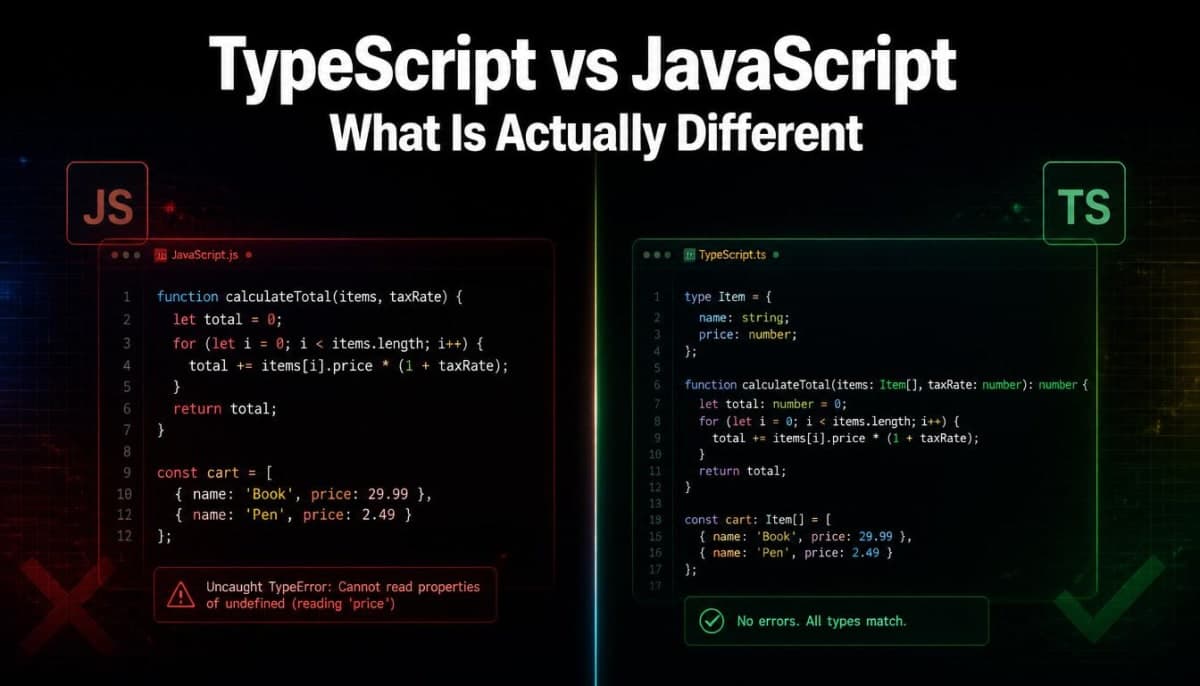
TypeScript vs JavaScript - What Is Actually Different and Should You Learn TypeScript
TypeScript and JavaScript are more related than most people think. This guide covers the real difference, core TypeScript features you need to know, and helps you decide whether to make the switch.
TypeScript vs JavaScript - What Is Actually Different and Should You Learn TypeScript
If you are just getting into web development, you have probably seen both names come up. JavaScript everywhere, TypeScript in a lot of job postings and modern projects. And if you have been writing JavaScript for a while, someone has probably told you "just learn TypeScript, it is worth it."
But what actually is TypeScript? How different is it from JavaScript really? And should you bother learning it?
This blog answers all of that properly.
JavaScript First - What It Is and Where It Falls Short
JavaScript is the programming language of the web. Every browser understands it natively. It is what makes websites interactive - handling clicks, fetching data, updating the page without reloading. If you are building anything for the web, you are writing JavaScript in some form.
JavaScript is a dynamically typed language. This means you do not have to tell JavaScript what type of data a variable holds. You just create it and JavaScript figures it out at runtime.
let name = "Rahul"; // JavaScript sees this as a string
let age = 25; // JavaScript sees this as a number
let isActive = true; // JavaScript sees this as a boolean
This feels flexible and fast when you are starting out. But as your codebase grows, this flexibility starts causing problems.
Here is a simple example of how things can go wrong:
function addNumbers(a, b) {
return a + b;
}
console.log(addNumbers(5, 10)); // 15 - correct
console.log(addNumbers("5", 10)); // "510" - wrong, but no error
JavaScript did not warn you. It just ran the code and gave you a wrong answer silently. In a small script this is easy to spot. In a large codebase with hundreds of functions and files, these kinds of bugs can hide for a long time and cause real problems in production.
This is the core problem TypeScript was built to solve.
What TypeScript Actually Is
TypeScript is not a completely different language. It is JavaScript with types added on top. It was created by Microsoft and released in 2012, and it has grown massively since then.
Every valid JavaScript file is also valid TypeScript. You are not throwing away what you know - you are adding a layer on top of it.
The key addition is that TypeScript lets you explicitly define what type of data a variable, function parameter, or return value should be. The TypeScript compiler then checks your code before it runs and tells you if something does not match.
function addNumbers(a: number, b: number): number {
return a + b;
}
addNumbers(5, 10); // works fine
addNumbers("5", 10); // TypeScript error - Argument of type 'string' is not assignable to parameter of type 'number'
That error shows up in your editor before you even run the code. TypeScript caught the bug at the point where you wrote it, not after it caused a problem in production.
One important thing to understand: browsers do not understand TypeScript. TypeScript code is compiled down to regular JavaScript before it runs in the browser. TypeScript is a development tool - it helps you write better code, but what actually runs is still JavaScript.
The Core Difference - Static Typing vs Dynamic Typing
This is the fundamental difference between the two.
JavaScript is dynamically typed - types are checked at runtime, when the code is actually running.
TypeScript is statically typed - types are checked at compile time, before the code runs.
Think of it like this. Dynamic typing is like submitting an assignment and only finding out you made mistakes when the teacher marks it. Static typing is like having a spell checker that highlights mistakes as you type them.
Neither is wrong. But for large projects with multiple developers, catching mistakes early saves a lot of time.
Types in TypeScript - The Basics
If you are new to TypeScript, here are the fundamental types you will use constantly.
Basic types:
let username: string = "Priya";
let age: number = 24;
let isLoggedIn: boolean = false;
let score: number[] = [10, 20, 30]; // array of numbers
Object types using interfaces:
An interface is a way to describe the shape of an object - what properties it has and what type each property is.
interface User {
id: number;
name: string;
email: string;
isAdmin: boolean;
}
function getUser(user: User) {
return `${user.name} - ${user.email}`;
}
const newUser: User = {
id: 1,
name: "Rahul",
email: "rahul@example.com",
isAdmin: false,
};
getUser(newUser); // works perfectly
If you try to pass an object that is missing a property or has a wrong type, TypeScript will catch it immediately.
Optional properties:
Sometimes a property might or might not exist. You mark it with a ?:
interface Product {
id: number;
name: string;
description?: string; // this is optional
price: number;
}
Union types - when a value can be more than one type:
let id: string | number; // id can be either a string or a number
id = 101; // fine
id = "user_101"; // also fine
id = true; // TypeScript error
Type aliases:
Similar to interfaces but more flexible for complex types:
type Status = "active" | "inactive" | "pending";
let userStatus: Status = "active"; // fine
let userStatus2: Status = "banned"; // TypeScript error - "banned" is not in the type
This last example is genuinely powerful. You are telling TypeScript exactly what values are valid for a variable, and it will warn you if you use anything else. No more typos causing silent bugs.
What TypeScript Does That JavaScript Simply Cannot
Beyond basic type checking, TypeScript adds features that make large codebases significantly easier to work with.
Better autocompletion in your editor:
When TypeScript knows the shape of your objects, your editor (VS Code especially) can suggest the exact properties and methods available. You do not have to remember or look up what properties an object has - your editor tells you.
interface Order {
id: number;
items: string[];
totalAmount: number;
status: "pending" | "shipped" | "delivered";
}
function processOrder(order: Order) {
order. // your editor shows: id, items, totalAmount, status
}
Catching refactoring mistakes:
When you rename a function or change its parameters in a large JavaScript project, finding every place that uses it is tedious and error-prone. In TypeScript, if you change a function signature, every call to that function that no longer matches will immediately show an error. You can refactor confidently.
Generics - writing reusable code that works with any type:
This is a more advanced feature but worth knowing it exists:
function getFirstItem<T>(items: T[]): T {
return items[0];
}
getFirstItem([1, 2, 3]); // returns number
getFirstItem(["a", "b", "c"]); // returns string
The T is a placeholder for whatever type you pass in. The function works for any type while still being type-safe.
Where JavaScript Still Makes Sense
TypeScript is not the answer to every situation. There are real cases where plain JavaScript is perfectly fine.
Small scripts and quick projects - If you are writing a small utility script, a quick prototype, or a personal project that will not grow, setting up TypeScript is extra overhead with little benefit.
Learning the fundamentals - If you are just starting with programming or web development, learn JavaScript first. Understanding variables, functions, loops, and how the browser works is more important than types. Adding TypeScript before you are comfortable with JavaScript fundamentals will slow you down.
Projects with lots of dynamic data - If your data structures change a lot at runtime and are hard to predict, TypeScript can feel like you are fighting the type system more than you are writing features.
Where TypeScript Clearly Wins
Large codebases - When a project has hundreds of files and multiple developers working on it, TypeScript prevents entire categories of bugs that would otherwise only show up in production.
Team projects - When someone else wrote a function three months ago and you need to use it today, TypeScript tells you exactly what it expects and what it returns. You do not have to read through the implementation or hope there are comments.
APIs and data handling - When you are working with API responses, TypeScript lets you define exactly what shape the data should be. If the API changes and sends different data, TypeScript will catch the mismatch.
Long-term projects - The longer a project lives, the more you will appreciate TypeScript. Things that seemed obvious when you wrote them become unclear six months later. Types serve as living documentation.
Should You Learn TypeScript?
If you are a complete beginner - get comfortable with JavaScript first. Build some projects. Understand how the language works. Then move to TypeScript.
If you already know JavaScript and you want to get better at it or be more hireable - yes, learn TypeScript. It is not a huge leap. The syntax additions are straightforward and the benefits show up almost immediately. Most serious frontend and backend JavaScript projects today use TypeScript. Next.js, which we have already covered on this blog, has built-in TypeScript support. Most companies hiring React or Node.js developers expect TypeScript knowledge.
The honest truth is that TypeScript has become the standard in professional JavaScript development. Learning it is not optional anymore if you want to work on real production codebases.
A Side by Side Look
JavaScript | TypeScript | |
|---|---|---|
Typing | Dynamic - types at runtime | Static - types at compile time |
Error detection | At runtime (when code runs) | At compile time (before code runs) |
Browser support | Native | Needs to compile to JavaScript first |
Learning curve | Lower | Slightly higher |
Editor support | Good | Excellent (autocomplete, hints) |
Best for | Small projects, beginners, quick scripts | Large codebases, teams, production apps |
Job market | Required everywhere | Increasingly expected |
The Bottom Line
TypeScript is not a replacement for JavaScript. It is JavaScript with guardrails. The same language you already know, but with a layer that catches mistakes before they become bugs.
If you are just starting out, learn JavaScript first and do it properly. Once you are comfortable, TypeScript will feel like a natural upgrade - not a completely new thing to learn. Most of what you know transfers directly, you are just adding types on top.
And once you start using TypeScript on a real project, going back to plain JavaScript starts feeling uncomfortable. That is when you know it clicked.
Related Articles
More insights you might enjoy
SSR, CSR, SSG, and ISR in Next.js - What They Are and When to Use Each One
Next.js gives you four ways to render pages and each solves a different problem. This guide explains all four with real code examples and a practical decision guide.

React vs Next.js: What's Actually Different and When to Use Which
React and Next.js are often confused - one is a UI library, the other is a full framework built on top of it. This post breaks down the real differences: rendering strategies, routing, API routes, and when to pick one over the other.

HTTP Status Codes Explained - What They Actually Mean and Why Developers Should Know Them
Most developers know 200 and 404. But understanding the full range - and when to use them in your own APIs - makes you a noticeably better backend developer.
How React's useEffect Actually Works - And Why Developers Misuse It
useEffect is one of the most used hooks in React and also one of the most misunderstood. This guide covers the dependency array, cleanup functions, the double render, and common mistakes that cause bugs.
Comments
Sign in to join the conversation