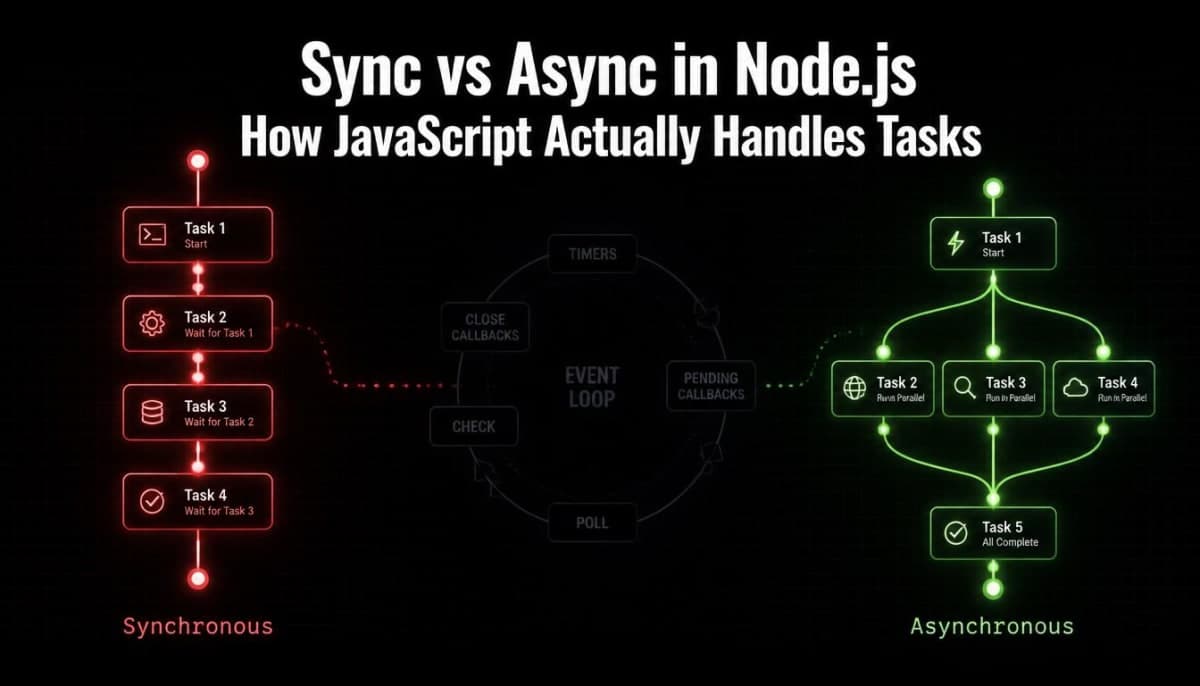
Synchronous and Asynchronous in Node.js - How JavaScript Actually Handles Tasks
One of the most important concepts in Node.js and one of the most misunderstood. Covers the event loop, callbacks, Promises, and async/await with real examples.
Synchronous and Asynchronous in Node.js - How JavaScript Actually Handles Tasks
If you have been writing JavaScript or Node.js for any amount of time, you have come across words like async, await, callbacks, and Promises. Maybe you understood them well enough to get your code working. Maybe you just copied a pattern from Stack Overflow and moved on.
But if someone asked you to explain what asynchronous actually means, or why Node.js handles things differently from other languages - could you answer that clearly?
This blog is about building that understanding properly. Not just how to write async code, but why it works the way it does.
Start Here - What Synchronous Actually Means
Synchronous means one thing at a time, in order. Each line of code runs, finishes completely, and only then does the next line start.
console.log("First");
console.log("Second");
console.log("Third");
Output:
First
Second
Third
Simple. Predictable. Each line waits for the one before it.
Now here is where it becomes a problem. Some tasks take time - reading a file from disk, fetching data from an API, querying a database. If JavaScript ran these synchronously, it would stop everything and wait for each task to finish before moving to the next one.
// Imagine this is a synchronous database call
const users = database.getUsers(); // waits 500ms
const orders = database.getOrders(); // waits 500ms after users finishes
const products = database.getProducts(); // waits 500ms after orders finishes
console.log("Done"); // only runs after 1500ms total
In a server handling hundreds of requests, this would be a disaster. Every request would have to wait in line while the previous one finishes. One slow database query would block everything else.
This is exactly the problem Node.js was designed to solve.
JavaScript is Single Threaded - And That is Fine
Here is something that surprises a lot of developers: JavaScript runs on a single thread. It can only do one thing at a time.
But then how does it handle multiple requests without blocking? How does it run code after a delay without freezing everything?
The answer is the Event Loop - and understanding it changes how you think about asynchronous code entirely.
The Event Loop - The Heart of Node.js
Think of the event loop like a chef in a kitchen. The chef cannot cook two dishes at the exact same time with their own hands. But they can put something in the oven, set a timer, and while that is baking, start chopping vegetables. When the timer goes off, they go back to the oven.
The chef is single threaded. But they are not blocked waiting for the oven.
Node.js works the same way. When it hits a task that will take time - like a file read or a network request - it hands that task off to the operating system and moves on to the next thing. When the operating system finishes the task, it puts the result in a queue. The event loop keeps checking that queue and runs the callback when it is ready.
Your Code -> Hits async task -> Hands it off -> Moves to next line
|
OS handles the slow task
|
Task finishes -> Result goes into queue
|
Event loop picks it up -> Runs your callback
This is why Node.js can handle thousands of concurrent connections without needing thousands of threads. It is not doing multiple things at once - it is managing its waiting time efficiently.
Synchronous Code in Node.js
Node.js has both synchronous and asynchronous versions of most built-in operations. The synchronous ones block everything until they finish.
const fs = require("fs");
// Synchronous - blocks everything until the file is read
const data = fs.readFileSync("users.txt", "utf8");
console.log(data);
console.log("This only runs after the file is fully read");
The Sync at the end of readFileSync is the signal. It means - stop here, wait for this to finish, then continue.
This is fine in some situations - like a startup script that reads a config file before your server starts. But inside a request handler that thousands of users hit? Never use synchronous file or network operations there. You will block every other user while one person's request is being handled.
Asynchronous Code - Three Ways to Write It
JavaScript has gone through three different patterns for writing async code. You will see all three in the wild so it is worth understanding each one.
1. Callbacks - The Original Way
A callback is a function you pass into another function, to be called when the async task finishes.
const fs = require("fs");
fs.readFile("users.txt", "utf8", function(err, data) {
if (err) {
console.error("Error reading file:", err);
return;
}
console.log(data);
});
console.log("This runs immediately, before the file is read");
Output:
This runs immediately, before the file is read
(file contents appear here after the file is read)
The readFile call does not block. Node.js hands the file reading to the OS, moves to the next line, and when the file is ready, calls your callback function with the result.
The err parameter comes first - this is a Node.js convention called error-first callbacks. Always check for errors before using the data.
The problem with callbacks - Callback Hell:
When you need to do multiple async tasks in sequence, callbacks start nesting inside each other:
fs.readFile("users.txt", "utf8", function(err, users) {
if (err) return console.error(err);
fs.readFile("orders.txt", "utf8", function(err, orders) {
if (err) return console.error(err);
fs.readFile("products.txt", "utf8", function(err, products) {
if (err) return console.error(err);
// Finally do something with all three files
console.log(users, orders, products);
});
});
});
This is called callback hell - code that keeps nesting deeper and deeper to the right. Hard to read, hard to maintain, hard to handle errors properly. This pattern led to Promises.
2. Promises - A Cleaner Way
A Promise is an object that represents a value that will be available in the future. It is either pending, resolved (success), or rejected (failure).
const fs = require("fs").promises;
fs.readFile("users.txt", "utf8")
.then(data => {
console.log(data);
})
.catch(err => {
console.error("Error:", err);
});
console.log("This still runs immediately");
Promises let you chain .then() calls instead of nesting callbacks:
fs.readFile("users.txt", "utf8")
.then(users => {
console.log("Got users");
return fs.readFile("orders.txt", "utf8"); // return next promise
})
.then(orders => {
console.log("Got orders");
return fs.readFile("products.txt", "utf8");
})
.then(products => {
console.log("Got all three files");
})
.catch(err => {
console.error("Something failed:", err);
});
One .catch() at the end handles errors from any step in the chain. Much cleaner than nested callbacks.
Running multiple async tasks at the same time:
If the tasks do not depend on each other, you can run them in parallel using Promise.all:
Promise.all([
fs.readFile("users.txt", "utf8"),
fs.readFile("orders.txt", "utf8"),
fs.readFile("products.txt", "utf8")
])
.then(([users, orders, products]) => {
console.log("All three files ready at the same time");
})
.catch(err => {
console.error("One of them failed:", err);
});
Instead of waiting 500ms + 500ms + 500ms in sequence, all three run at the same time and you wait for whichever takes the longest. Significantly faster.
3. Async/Await - The Modern Way
Async/await is built on top of Promises. It does not replace them - it is just a cleaner syntax for working with them. Code that uses async/await looks almost like synchronous code, which makes it much easier to read.
const fs = require("fs").promises;
async function readFiles() {
try {
const users = await fs.readFile("users.txt", "utf8");
console.log("Got users:", users);
const orders = await fs.readFile("orders.txt", "utf8");
console.log("Got orders:", orders);
return { users, orders };
} catch (err) {
console.error("Something went wrong:", err);
}
}
readFiles();
console.log("This still runs immediately - readFiles is async");
The await keyword pauses execution inside the async function until the Promise resolves - but it does not block the event loop. Other code can still run while this function is waiting.
The async keyword before a function means it always returns a Promise. You cannot use await inside a function that is not marked async.
Async/await with parallel execution:
You can still use Promise.all with async/await:
async function readAllFiles() {
try {
const [users, orders, products] = await Promise.all([
fs.readFile("users.txt", "utf8"),
fs.readFile("orders.txt", "utf8"),
fs.readFile("products.txt", "utf8")
]);
console.log("All files ready");
return { users, orders, products };
} catch (err) {
console.error("Error:", err);
}
}
Clean, readable, and all three files are fetched in parallel.
A Real Express Example - Async in Practice
This is what async/await looks like in a real Node.js and Express API. Imagine you are fetching a user from a database:
const express = require("express");
const app = express();
// Simulating a database call that takes time
function getUserFromDB(id) {
return new Promise((resolve, reject) => {
setTimeout(() => {
if (id === 1) {
resolve({ id: 1, name: "Rahul", email: "rahul@example.com" });
} else {
reject(new Error("User not found"));
}
}, 300); // simulates 300ms database delay
});
}
app.get("/users/:id", async (req, res) => {
try {
const user = await getUserFromDB(parseInt(req.params.id));
res.json(user);
} catch (err) {
res.status(404).json({ error: err.message });
}
});
app.listen(3000, () => console.log("Server running on port 3000"));
While this route handler is waiting for the database, Node.js is free to handle other incoming requests. That is the event loop at work. No blocking, no waiting in line.
Common Mistakes With Async Code
Forgetting await
async function getUser() {
const user = getUserFromDB(1); // missing await
console.log(user); // logs Promise { <pending> } not the actual user
}
Without await, you get the Promise object itself, not the resolved value. Always check you have await in front of async calls.
Using await in a loop inefficiently
// Slow - each request waits for the previous one
async function getUsersSequentially(ids) {
const users = [];
for (const id of ids) {
const user = await getUserFromDB(id); // waits for each one
users.push(user);
}
return users;
}
// Fast - all requests run at the same time
async function getUsersInParallel(ids) {
const users = await Promise.all(ids.map(id => getUserFromDB(id)));
return users;
}
If the tasks inside a loop do not depend on each other, run them in parallel with Promise.all. The difference in speed can be significant with multiple database calls.
Not handling errors
// No error handling - if this fails, your server might crash
async function riskyOperation() {
const data = await fetch("https://api.example.com/data").then(r => r.json());
return data;
}
// Always wrap async operations in try/catch
async function safeOperation() {
try {
const data = await fetch("https://api.example.com/data").then(r => r.json());
return data;
} catch (err) {
console.error("Fetch failed:", err);
return null;
}
}
Unhandled Promise rejections can crash your Node.js server. Always use try/catch in async functions.
Synchronous vs Asynchronous - When to Use Which
Use synchronous code when:
Running setup tasks before your server starts (reading config files, checking environment variables)
Writing simple scripts that run once and exit
The task is instant and involves no I/O (calculations, string manipulation, array operations)
Use asynchronous code when:
Reading or writing files during a request
Making database queries
Calling external APIs
Anything that involves waiting for data from outside your application
The rule of thumb: if it involves the network, the file system, or a database - make it async.
The Mental Model Worth Keeping
Synchronous code runs line by line and blocks everything while waiting.
Asynchronous code starts a task, moves on, and comes back when the result is ready - without blocking anything else.
Node.js is built around this model. The event loop is what makes it work. Callbacks, Promises, and async/await are just different ways of writing code that works with this model - each one cleaner than the one before it.
If you are writing Node.js today, async/await is the pattern to default to. It is the most readable, the easiest to debug, and the one you will see in most modern codebases. Just remember it is still Promises underneath - and knowing that will help you when things get more complex.
Related Articles
More insights you might enjoy

SSR, CSR, SSG, and ISR in Next.js - What They Are and When to Use Each One
Next.js gives you four ways to render pages and each solves a different problem. This guide explains all four with real code examples and a practical decision guide.

React vs Next.js: What's Actually Different and When to Use Which
React and Next.js are often confused - one is a UI library, the other is a full framework built on top of it. This post breaks down the real differences: rendering strategies, routing, API routes, and when to pick one over the other.

HTTP Status Codes Explained - What They Actually Mean and Why Developers Should Know Them
Most developers know 200 and 404. But understanding the full range - and when to use them in your own APIs - makes you a noticeably better backend developer.

How React's useEffect Actually Works - And Why Developers Misuse It
useEffect is one of the most used hooks in React and also one of the most misunderstood. This guide covers the dependency array, cleanup functions, the double render, and common mistakes that cause bugs.

TypeScript vs JavaScript - What Is Actually Different and Should You Learn TypeScript
TypeScript and JavaScript are more related than most people think. This guide covers the real difference, core TypeScript features you need to know, and helps you decide whether to make the switch.

Node.js and Express.js - What They Are, How They Differ, and How They Work Together
Node.js and Express.js are not the same thing. This guide explains what each does, how they work together, and covers routing, middleware, and error handling with real code.
Comments
Sign in to join the conversation